
QCS FOUNDATIONS • UPDATED 3 NOVEMBER 2026
03 / TCP, UDP, service ports and DNS
Read the headers behind a TCP exchange, a service port and a separate DNS lookup.
Guided analysis · conditional practicals · appliance runtime validation pending
Explore the packet flow — pause, replay or open full screen to inspect headers.
Foundations: guided analysis. Animations are authored examples, not captured appliance results. Practical exercises are conditional drafts: run them only after exact-build licensing, isolation, private management, protected backup and baseline acceptance checks pass. No FortiGate/GNS3 appliance runtime has been validated for this course.
One address can host several services
Prerequisites: lessons 1–2. TCP provides an ordered byte stream using connection state, acknowledgements and retransmission; it cannot promise the application will succeed. UDP sends datagrams without built-in delivery or ordering guarantees. A socket endpoint combines an IP address, transport and port. A client usually uses a temporary ephemeral port; the server listens on a configured service port.
Worked example: illustrative client 10.77.10.10:49152 → server 10.77.20.10:8080 over TCP. Actual client ports vary. Reply: 10.77.20.10:8080 → 10.77.10.10:49152. Port 8080 is chosen for this helper; it does not prove application identity. DNS resolves names into records such as addresses, commonly using UDP or TCP 53. A name-based application may need both DNS access and application access. This lab has no DNS server.
Keep these terms beside the explorer
- Socket endpoint
- An IP address, transport protocol and port used by a communicating application. TCP 8080 and UDP 8080 are different transport endpoints.
- Ephemeral port
- A temporary client port chosen by the local stack. The illustrated 49152 is an example, not a runtime requirement.
- Listener
- A process waiting for traffic on a local address/transport/port. ss -ltn reads numeric listening TCP sockets.
- SYN / ACK
- TCP flags used in connection setup and acknowledgement. The three-message handshake is SYN, SYN-ACK, then ACK.
- DNS A record
- A DNS record supplying an IPv4 address for a name. An answer alone does not prove application access.
- HTTP status
- An application response code such as 200 or 404. Receiving an HTTP error is different from failing to establish any useful response.
Build the idea: transport setup, application data and naming
The address chooses an interface destination; the transport protocol and port choose a communication endpoint there. TCP port 8080 and UDP port 8080 are different transport endpoints. A server process must bind/listen on the address and transport expected by the client. A temporary client port lets the stack distinguish conversations; 49152 in these examples is a teaching value, not a promised runtime port.
Read the TCP handshake as three messages: SYN starts connection setup; SYN-ACK answers that setup from the server; ACK acknowledges it from the client. Afterward, HTTP request bytes can travel inside TCP. TCP supplies an ordered byte stream, so an HTTP message may span several segments or share a segment with other bytes; the illustrations do not assert packet-for-message boundaries.
| Message | Source endpoint | Destination endpoint | Meaning |
|---|---|---|---|
| SYN | 10.77.10.10:49152 | 10.77.20.10:8080 | Client starts transport setup |
| SYN-ACK | 10.77.20.10:8080 | 10.77.10.10:49152 | Server answers setup |
| ACK / HTTP request | 10.77.10.10:49152 | 10.77.20.10:8080 | Client acknowledges; later sends application bytes |
| HTTP response | 10.77.20.10:8080 | 10.77.10.10:49152 | Server sends status/body over TCP |
What DNS adds—and what this lab deliberately supplies locally
A name such as app.qcs.test needs an address selection mechanism before the application can connect. A DNS A record can supply an IPv4 address. DNS is a separate conversation, commonly using UDP or TCP destination 53. A successful lookup does not permit the later HTTP flow. Conversely, an HTTP request to a numeric address does not require a lookup for that address.
The resolver in the explorer is an abstract dependency, with no assigned address, cable or configured GNS3 node. The actual exercise uses a numeric URL and then curl --resolve. The latter supplies a name/address mapping for that one curl invocation; it does not alter the system resolver or send a live query for that supplied mapping. Keep that distinction in the evidence worksheet.
HTTP status is another layer of evidence
HTTP 200 means the server answered the request successfully at the application layer. HTTP 404 from the included helper means it answered but did not serve that requested path. A connection refusal, timeout and HTTP error are different observations. None should automatically be renamed “FortiGate blocked it.” Plain HTTP does not encrypt the request or response.
Lab 03: prove each dependency separately
Conditional practical: complete the exact-build setup and baseline gates first. Until then, use this as guided analysis and leave observed results blank.
- Start the helper in its foreground server console. In a supported second server terminal, run
ss -ltn. If a second terminal is unavailable, stop for the instructor’s console method; do not improvise process control. - Read the listening address and port. Expected: 10.77.20.10:8080. A listener on a different address, including loopback only, does not match this baseline.
- From the client, request the numeric URL. Record status and fixed body if received.
- Use the correct
--resolvemapping. Record whether the same helper responds. State explicitly that no resolver was tested. - Only after verifying .99 is unused in the isolated project, run the wrong-mapping command once. Keep the timeout bounds; do not broaden the policy.
- Restore the command mapping to .10 and retest. No hosts/resolver file was modified. Stop the helper with Ctrl+C after the final successful comparison.
SERVER second Ubuntu terminal:
ss -ltn

CLIENT numeric request:
curl --noproxy "*" --connect-timeout 3 --max-time 5 --include http://10.77.20.10:8080/

CLIENT correct mapping:
curl --noproxy "*" --connect-timeout 3 --max-time 5 --include --resolve app.qcs.test:8080:10.77.20.10 http://app.qcs.test:8080/

CLIENT bounded wrong-mapping fault; only if .99 is verified unused:
curl --noproxy "*" --connect-timeout 3 --max-time 5 --include --resolve app.qcs.test:8080:10.77.20.99 http://app.qcs.test:8080/| Part | Meaning |
|---|---|
| ss -ltn | Show listening (-l), TCP (-t), numeric (-n) sockets; read-only |
| app.qcs.test:8080:10.77.20.10 | The exact host, service port and address supplied to curl |
| http://app.qcs.test:8080/ | HTTP URL retaining the name while the mapping supplies its destination IP |
| Ctrl+C in helper terminal | Stop only the known foreground helper; do not kill unrelated listeners |
Diagnosis order: listener first, numeric HTTP second, mapping string third. If numeric HTTP already fails, changing DNS is not a supported fix. The wrong .99 address also does not match the baseline’s server /32 permit; its failure cannot isolate DNS from policy. Acceptance: listener matches, numeric and correct-mapping requests return the expected response, the original mapping is restored, and cleanup is scoped to the helper.
See the conversation
Detailed diagram: scroll horizontally to inspect full-size labels. The text path below reflows on phones.
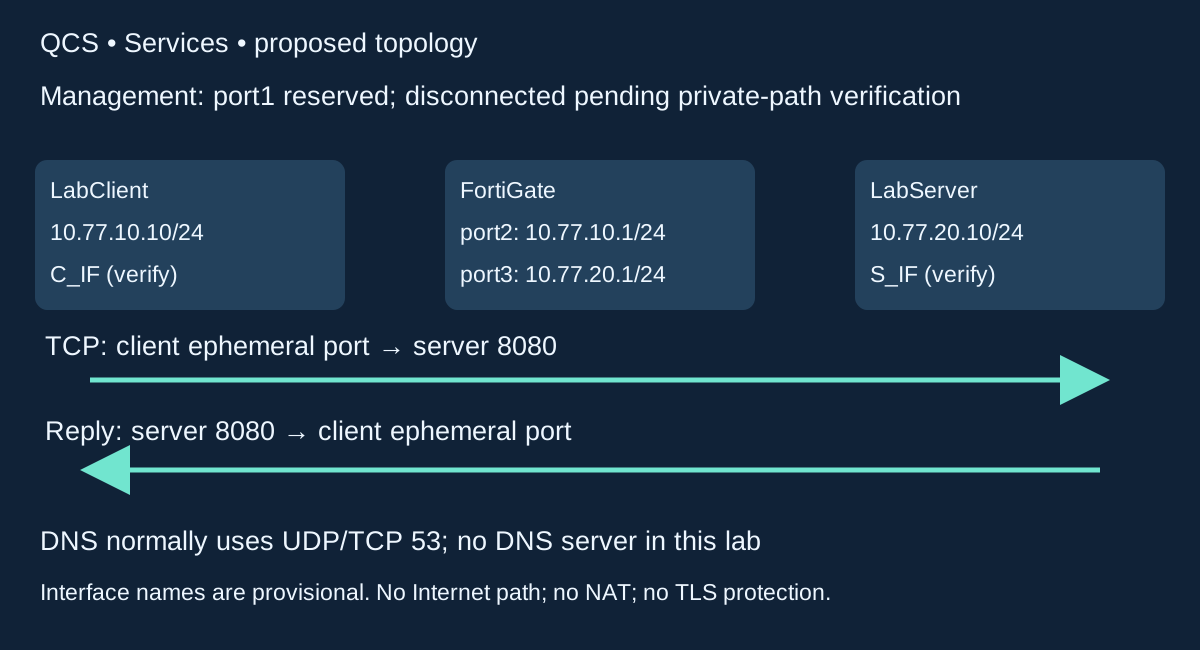
Client → DNS resolver UDP/TCP destination 53; resolver → client returns a record. No resolver node or DNS rule is configured in this lab.
Client ephemeral TCP port → 10.77.20.10 TCP 8080, through the FortiGate. Reply reverses those endpoint ports.
Numeric URL and curl --resolve avoid live DNS. Success of either cannot prove DNS access works.
Slow packet explorer • inspect one hop at a time
Start paused. Choose any step, use Previous/Next, or play at your chosen pace. Keyboard: Tab to controls, then Enter/Space; arrow keys work in the native selectors. This is an authored simulation, not a real packet capture.
MAC symbols: C_MAC = client NIC; FG_P2_MAC = client-facing firewall NIC; FG_P3_MAC = server-facing firewall NIC; S_MAC = server NIC. Real names/MACs and build are unverified. ARP cache may already be populated. No NAT or TLS is configured.
10.77.10.10/24
port2 10.77.10.1
port3 10.77.20.1
Full IPs shown in the packet fields
10.77.20.10/24
Concept only; not in lab
Ethernet / local link
IP endpoints / ARP target
Transport header
Decision at this step
Why this happens
What would verify it?
Playing the explorer advances teaching steps only. It sends no network traffic and changes no lab settings. Forward/return lanes summarize packet direction; timing is instructional, not measured latency.
Complete step reference — readable without JavaScript
1. Ask DNS for an address — concept only
Ethernet: DNS link/path unspecified
IP / ARP: 10.77.10.10 → abstract resolver IP (not assigned)
Transport: UDP 53000 → 53; query A app.qcs.test
Decision: Not a configured lab exchange
Why: A name lookup is a separate dependency. The resolver is not a fourth GNS3 node in this project. Ports and resolver path here are illustrative.
Evidence: The actual numeric URL and curl --resolve do not send this DNS query.
2. Receive a DNS record — concept only
Ethernet: DNS link/path unspecified
IP / ARP: Abstract resolver IP → 10.77.10.10
Transport: UDP 53 → 53000; example A answer 10.77.20.10
Decision: An answer provides an address, not application access
Why: Real DNS may use TCP 53 as well. A record does not prove that routing, firewall policy or HTTP works.
Evidence: No live resolver is configured or tested. Cache, retransmission and TCP fallback are omitted from this illustrative exchange.
3. Check the intended TCP listener
Ethernet: No packet sent by this check
IP / ARP: Listener: 10.77.20.10:8080
Transport: ss -ltn: listening TCP sockets, numeric output
Decision: The helper must be running on the intended address/port
Why: A port identifies a transport endpoint, not a person or trusted application. A listener is necessary for this helper but is not end-to-end proof.
Evidence: Server second terminal: ss -ltn. Do not silently background unknown commands if only one console is available.
4. Client sends SYN to its gateway
Ethernet: C_MAC → FG_P2_MAC
IP / ARP: 10.77.10.10 → 10.77.20.10
Transport: TCP SYN; 49152 → 8080
Decision: New session attempt; client source port is illustrative
Why: SYN starts TCP connection setup. The destination service port remains 8080 even though Ethernet delivery is to the gateway.
Evidence: Match the actual ephemeral port if a real trace is available; do not require it to equal 49152.
5. Firewall forwards SYN to the server
Ethernet: FG_P3_MAC → S_MAC
IP / ARP: 10.77.10.10 → 10.77.20.10
Transport: TCP SYN; 49152 → 8080
Decision: Narrow TCP 8080 permit; routed server-side link
Why: The source/destination IPs and ports stay unchanged because NAT is off. The Ethernet header changes across the router.
Evidence: This assumes validated route, policy and neighbor state; the illustration is not measured appliance evidence.
6. Server returns SYN-ACK to its gateway
Ethernet: S_MAC → FG_P3_MAC
IP / ARP: 10.77.20.10 → 10.77.10.10
Transport: TCP SYN + ACK; 8080 → 49152
Decision: Server has listener and return route
Why: SYN-ACK both acknowledges connection setup and supplies the server side of the handshake. It is not an HTTP response.
Evidence: A refused connection or reset differs from silence; neither alone identifies a FortiGate policy decision.
7. Firewall forwards the matching SYN-ACK
Ethernet: FG_P2_MAC → C_MAC
IP / ARP: 10.77.20.10 → 10.77.10.10
Transport: TCP SYN + ACK; 8080 → 49152
Decision: Reply matches the permitted conversation
Why: The reply source port is the server service port. The reply destination port is the client temporary port.
Evidence: Reverse both endpoint roles; do not mistakenly keep destination port 8080 in the reply.
8. Client completes setup with ACK
Ethernet: C_MAC → FG_P2_MAC; then FG_P3_MAC → S_MAC
IP / ARP: 10.77.10.10 → 10.77.20.10
Transport: TCP ACK; 49152 → 8080
Decision: TCP connection setup complete
Why: The handshake establishes transport state. It does not certify user identity, encrypt payloads or guarantee a useful application response.
Evidence: Sequence numbers, options, windows and most acknowledgements are omitted; no exact packet byte layout is claimed.
9. Send the HTTP request bytes
Ethernet: C_MAC → FG_P2_MAC; then FG_P3_MAC → S_MAC
IP / ARP: 10.77.10.10 → 10.77.20.10
Transport: TCP carrying HTTP GET /; 49152 → 8080
Decision: Request the helper root path /
Why: HTTP is the application protocol inside TCP. One application message is not guaranteed to equal one captured TCP segment.
Evidence: Client curl --include shows response headers; it is not a packet capture or a TLS check.
10. Return HTTP status and fixed body
Ethernet: S_MAC → FG_P3_MAC; then FG_P2_MAC → C_MAC
IP / ARP: 10.77.20.10 → 10.77.10.10
Transport: TCP carrying HTTP 200; 8080 → 49152
Decision: Expected helper response, if the whole path works
Why: A 200 response is stronger application evidence than a completed handshake. Plain HTTP does not protect confidentiality.
Evidence: Match the bounded client request, helper request line and policy/session evidence at the same time.
11. Separate application status from connectivity
Ethernet: No new frame required for this explanation
IP / ARP: 10.77.20.10 → 10.77.10.10
Transport: HTTP status is application data
Decision: For example, a 404 can show the server answered a different path
Why: A response error and a network timeout are different observations. Check what URL/path was requested before changing network rules.
Evidence: The included helper intentionally rejects non-root paths; a 404 from it is not proof that TCP was blocked.
12. Isolate name selection with --resolve
Ethernet: C_MAC → FG_P2_MAC; then FG_P3_MAC → S_MAC
IP / ARP: 10.77.10.10 → 10.77.20.10
Transport: TCP 49152 → 8080; curl supplies name mapping
Decision: Use app.qcs.test:8080:10.77.20.10 in this one command
Why: The HTTP Host name can stay app.qcs.test while the destination IP is supplied locally. No DNS server is queried for this mapping.
Evidence: Correct mapping and numeric URL should reach the same helper. Neither result verifies DNS infrastructure.
13. Fault only the command-local mapping
Ethernet: No trusted next-hop outcome is assumed
IP / ARP: Incorrect mapped destination: 10.77.20.99
Transport: TCP destination 8080; one bounded attempt
Decision: Use .99 only after it is verified unused in the isolated project
Why: A failure to the wrong address is not a DNS-server outage or a proved firewall block. The server-specific permit does not match .99.
Evidence: Restore the mapping to .10; do not edit hosts/resolver files or add broader rules.
14. Retest and clean up only the helper
Ethernet: S_MAC → FG_P3_MAC; then FG_P2_MAC → C_MAC
IP / ARP: 10.77.20.10 → 10.77.10.10
Transport: Fresh HTTP 200 expected after correct mapping restored
Decision: Verify listener, correct address and bounded response
Why: Restore the original command, make one fresh request, then Ctrl+C only the foreground helper if finished. No persistent DNS change was made.
Evidence: Record expected versus observed separately. No packet trace, FortiOS build or successful appliance test is invented.
Slow packet film: 14 steps, six seconds per step (84 seconds total). Pause to inspect the headers, or use the explorer above at 10/15 seconds per step. Film timing is instructional; it is not measured network latency.
No autoplay. Use native pause or leave the static diagram visible. Reusable GIF download. The static diagram and caption are the reduced-motion alternative; GIFs are not embedded.
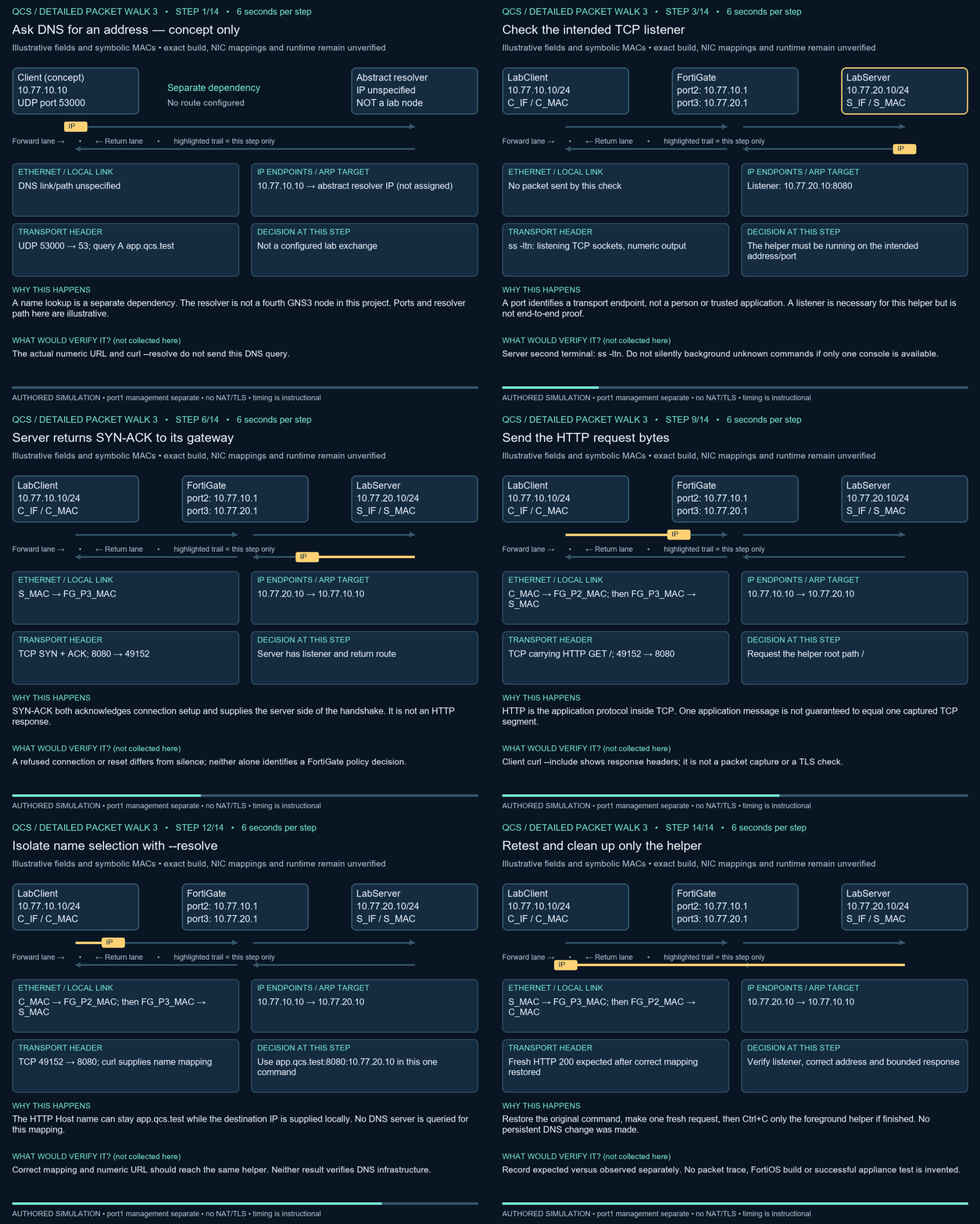
Practical 03 • separate listener, HTTP and naming
Conditional practical: complete the exact-build setup and baseline gates first. Until then, use this as guided analysis and leave observed results blank.
Start the helper in the server console. In a second server terminal inspect the listening socket. If GNS3 exposes only one console, use a supported second guest terminal or stop and ask the instructor; do not background unknown processes.
SERVER second Ubuntu terminal:
ss -ltn

CLIENT:
curl --noproxy "*" --connect-timeout 3 --max-time 5 --include http://10.77.20.10:8080/
curl --noproxy "*" --connect-timeout 3 --max-time 5 --include --resolve app.qcs.test:8080:10.77.20.10 http://app.qcs.test:8080/
ss inspects sockets; -l means listeners, -t TCP, -n numeric values. Expected listener: 10.77.20.10:8080. This command is read-only. --resolve supplies an in-command name/address mapping for curl only; it is not a DNS query and changes no hosts file.
- Record the listener and numeric HTTP result; expect 200 if baseline passes.
- Run the supplied mapping request. Expected same HTTP response; it isolates name selection without a DNS server.
- Bounded fault: change only the mapping in the command to
app.qcs.test:8080:10.77.20.99, after verifying .99 is unused in this isolated project. Expect failure. This is a deliberately wrong local mapping, not proof of DNS filtering. - Rollback: rerun the original mapping to .10. No persistent file was changed. Acceptance: correct listener and HTTP 200 return. Cleanup: Ctrl+C in helper terminal.
Diagnosis and practice
Check three things in order: listener address/port, literal-IP HTTP result, supplied mapping string. If numeric access fails, do not start changing DNS. Stop after these checks and restore the original command. UDP and real DNS remain guided-analysis activities: draw client → resolver:53 and then client → application:8080 as two separate conversations. Practice: reverse the worked tuple; explain why a successful --resolve request does not prove DNS works; name one reason an allowed port may still fail. Answers: server:8080 → client:49152; no resolver was queried; stopped listener or missing route.
Evidence and boundaries
Use the evidence worksheet. Write prediction before observation; record time, exact command, endpoints, policy ID if available and a redacted result. Leave actual-result cells blank until tested. Never paste passwords, license files, serials, full configurations or recovery backups into the preview.
Stop after one failed attempt and up to three focused checks. A timeout alone is inconclusive: service, route, host filtering or firewall policy may be responsible. Restore the stated fault before trying a different hypothesis.
More practice • explain before revealing the answer
Why can TCP setup succeed while an application fails?
TCP transport setup does not guarantee the application supplies the requested response.
What are the reply ports for client 49152 → server 8080?
Server source 8080 → client destination 49152.
What does a 404 from this helper tell you?
The application answered a path it does not serve; TCP was not simply blocked for that response.
Does --resolve verify a DNS policy?
No. It supplies a mapping locally to curl for that command.
Why not add a DNS server silently to this topology?
It would change nodes, routes, policy dependencies and setup requirements beyond this three-node exercise.
Can an allowed port prove application identity or encryption?
No. A port number does not establish either.
QCS Institute · FortiGate foundations
Work through the explanation, inspect each header, then use the lab acceptance checks.