
Start with a familiar situation. Learn what the network does and where the comparison stops being accurate.
QCS CCNA Daily / 200-301
CCNA 200-301 Networking Course
New to computers? Start with clicking, typing and saving a file. Then learn how networks work, one clear example at a time. No previous computer or networking knowledge is needed.
CCNA means Cisco Certified Network Associate. This free course helps you build the skills behind that certification. Read, try and repeat at your own pace.
- Exam by date
- 200-301 CCNA v1.1
- Version transition
- 3 Feb 2027
- Learning rhythm
- Monday to Friday
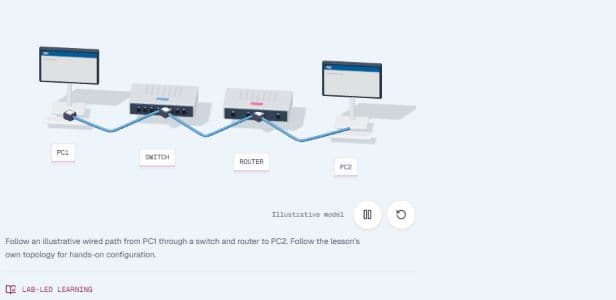
Illustrative model
Follow an illustrative wired path from PC1 through a switch and router to PC2. Follow the lesson's own topology for hands-on configuration.
Clear explanationsGuided labsPractice questions
Before the 60 lessons
Your first six small steps.
Begin here when computer words are new to you. Each step includes an explanation, a safe task and a question with an answer. You can read on a phone; later software labs need a suitable computer.
Open the beginner guideWhich exam version?
Choose by your planned exam date.
Cisco lists v1.1 testing through 2 February 2027, with v2.0 starting on 3 February 2027. Checked 2026-09-15. The syllabus separates named exam objectives from supporting foundations. No later 200-301 release was verified for the research horizon ending September 2027. Cisco transition guidance.
How every lesson works
Understand. Try. Check. Repeat.
Start with something familiar, learn the new words, and see a worked example before trying it yourself. There is no deadline for understanding an idea.
See where to click, what to type and what each command means. Practice only on the course's safe test network.
Compare your result with the expected result. Follow the checks when something goes wrong, then try again.
Use a hint when you need one. Answer original questions and take a quiz with explanations, not just a score.
Complete syllabus
60 lessons, at your pace.
New lessons are scheduled Monday to Friday over 12 weeks. That is our publication schedule, not a time limit for you. Start with the beginner guide and work through the lessons in order.
Network fundamentals
Network Foundations and the Packet Journey
- Day 01Your first network: a step-by-step CCNA beginner lesson
Connect two practice computers, understand each command, find one wrong address and check the repair.
v1.1: Exam orientation / v2.0: Practical skills orientation - Day 02Routers, switches, firewalls, access points, and endpoints
Explain what each common network component decides and forwards.
v1.1: 1.1 / v2.0: 1.0 - Day 03Campus, WAN, SOHO, cloud, and spine-leaf topologies
Compare common physical and logical designs using traffic paths and failure domains.
v1.1: 1.2 / v2.0: 1.0 - Day 04OSI and TCP/IP models without memorization
Use layered models to organize fault evidence instead of merely reciting layer names.
v1.1: Foundation for 1.0 / v2.0: Foundation for 2.4 - Day 05Encapsulation: what changes hop by hop
Trace frames, packets, segments, addresses, and checksums through a routed path.
v1.1: 1.0 / v2.0: 1.0 - Day 06Copper, fiber, speed, duplex, and interface errors
Select media and diagnose physical-interface evidence.
v1.1: 1.3-1.4 / v2.0: 1.1 - Day 07TCP and UDP through real applications
Choose the transport behavior that matches an application and read port evidence.
v1.1: 1.5 / v2.0: Supporting foundation
Network fundamentals and connectivity
IPv4 and IPv6 Addressing
- Day 08IPv4 addresses, masks, networks, and broadcasts
Identify network, host, and broadcast boundaries from an IPv4 prefix.
v1.1: 1.6 / v2.0: 1.3 - Day 09Subnetting in a reliable four-step method
Calculate subnets, ranges, and broadcasts accurately under time pressure.
v1.1: 1.6 / v2.0: 1.3 - Day 10VLSM and an address plan that can grow
Allocate unequal subnets without overlap and leave intentional growth space.
v1.1: 1.6 / v2.0: 1.3 - Day 11Public, private, APIPA, and default gateways
Recognize address scope and diagnose wrong-gateway symptoms.
v1.1: 1.6-1.7 / v2.0: 1.3 - Day 12IPv6 notation, prefixes, and compression
Read, shorten, expand, and compare IPv6 prefixes correctly.
v1.1: 1.8 / v2.0: 1.4 - Day 13IPv6 unicast, multicast, anycast, and link-local
Select the correct IPv6 address type and identify its scope.
v1.1: 1.9 / v2.0: 1.4 (unicast); other types support understanding - Day 14SLAAC, modified EUI-64, and IPv6 neighbor discovery
Explain how a host forms an address and discovers its local gateway.
v1.1: 1.8-1.9 / v2.0: 1.4
Network access
Switching and Network Access
- Day 15Cisco IOS CLI and a safe configuration workflow
Navigate IOS modes, save evidence, change safely, and verify state.
v1.1: 1.0 / v2.0: 2.4 - Day 16MAC learning, flooding, forwarding, and aging
Predict a switch decision from source and destination MAC information.
v1.1: 1.13 / v2.0: Foundation for 2.1-2.4 - Day 17VLANs and access ports
Verify data and voice VLANs and edge-port settings for computers, APs, phones and virtualized hosts; separate real PoE observations from simulated switching.
v1.1: 1.1.h, 2.1 / v2.0: 2.2 - Day 18802.1Q trunks and native VLAN behavior
Carry multiple VLANs between switches and diagnose trunk mismatches.
v1.1: 2.2 / v2.0: 2.1 - Day 19Inter-VLAN routing with router-on-a-stick
Route between VLANs with tagged router subinterfaces.
v1.1: 2.1-2.2 / v2.0: 2.1 - Day 20Inter-VLAN routing with switched virtual interfaces
Use Layer 3 switch interfaces and verify gateway reachability.
v1.1: 2.1 / v2.0: 2.1 - Day 21CDP, LLDP, and trustworthy topology documentation
Validate diagrams against directly observed neighbor evidence.
v1.1: 2.3 / v2.0: 2.3 - Day 22EtherChannel and LACP
Bundle compatible links and recognize configuration consistency failures.
v1.1: 2.4 / v2.0: 2.1 - Day 23Rapid PVST+: root bridge, roles, states, and cost
Predict the active Layer 2 tree and its blocked paths.
v1.1: 2.5 / v2.0: 2.5 - Day 24PortFast, BPDU guard, root guard, and loop guard
Apply Layer 2 protections at the correct trust boundary; distinguish BPDU filtering in the v1.1 blueprint.
v1.1: 2.5 / v2.0: 2.5 - Day 25Troubleshooting a switched campus path
Correlate interface, VLAN, MAC, LACP and spanning-tree evidence with show commands, extended ping, traceroute and packet-capture output.
v1.1: 2.1-2.5 / v2.0: 2.1-2.5
Network access and connectivity
Wireless Access
- Day 26RF, bands, channels, interference, and coverage
Explain why signal quality depends on more than visible bars.
v1.1: 1.11 / v2.0: 1.5 - Day 27Access points, controllers, CAPWAP, and roaming
Trace client, control, and data paths in controller-based wireless.
v1.1: 2.6-2.8 / v2.0: 2.2 - Day 28WLANs, SSIDs, VLANs, WPA2, and authentication
Map a secure wireless service from radio to policy and wired VLAN.
v1.1: 2.9, 5.9-5.10 / v2.0: 1.5, 2.2 - Day 29Wired and wireless client troubleshooting
Inspect Windows, macOS and Linux IP settings and reachability; separate RF, authentication, DHCP, DNS and upstream routing evidence.
v1.1: 1.10-1.11, 2.6-2.9 / v2.0: 1.6
IP connectivity and routing
IP Routing and Resilient Paths
- Day 30Reading the routing table and choosing a route
Use prefix length, administrative distance, metric, and next hop correctly.
v1.1: 3.1-3.2 / v2.0: 3.1 - Day 31IPv4 static routes
Configure and verify next-hop, exit-interface, and fully specified routes.
v1.1: 3.3 / v2.0: 3.2 - Day 32Default, host, and floating static routes
Use route specificity and administrative distance for primary and backup paths.
v1.1: 3.3 / v2.0: 3.2 - Day 33IPv6 static routes
Build and troubleshoot static IPv6 reachability.
v1.1: 3.3 / v2.0: 3.2 - Day 34Single-area OSPFv2 neighbors and router IDs
Form stable OSPF adjacencies and explain neighbor prerequisites.
v1.1: 3.4 / v2.0: 3.3 - Day 35OSPF broadcast networks, DR/BDR, and path cost
Interpret multiaccess elections and best-path decisions.
v1.1: 3.4 / v2.0: 3.3 - Day 36OSPFv3 for IPv6: the v2.0 bridge
Apply the same link-state reasoning to IPv6 routing.
v1.1: Extension / v2.0: 3.3 - Day 37HSRP, VRRP, and first-hop resilience
Interpret active gateway state and explain what redundancy does not protect.
v1.1: 3.5 / v2.0: 3.4
IP services and network operations
Network Services and Observability
- Day 38DHCPv4 clients, servers, and relay
Trace the lease exchange and configure relay across a router.
v1.1: 4.3, 4.6 / v2.0: 1.7 - Day 39DNS records and name-resolution troubleshooting
Use A, AAAA, CNAME, MX, NS, and PTR evidence to isolate a failure.
v1.1: 4.3 / v2.0: 4.4 - Day 40NAT and PAT from inside local to outside global
Configure address translation and read the translation table.
v1.1: 4.1 / v2.0: 4.3 - Day 41NTP and why trustworthy time matters
Configure time synchronization and connect clock accuracy to logs and certificates.
v1.1: 4.2 / v2.0: Supporting operations; not a named objective - Day 42QoS classification, marking, queuing, and congestion
Explain how delay, jitter, and loss shape application experience, including policing and shaping.
v1.1: 4.7 / v2.0: Supporting operations; not a named objective - Day 43SNMP, baselines, and meaningful monitoring
Explain polling, traps, object identifiers, and the limits of availability-only monitoring.
v1.1: 4.4 / v2.0: 5.4 - Day 44Syslog severity, facilities, and an incident timeline
Interpret messages in context and preserve time-aligned evidence.
v1.1: 4.5 / v2.0: 5.6 - Day 45Secure administration with SSH, SFTP and SCP
Protect administration and transfer configuration or software with SFTP/SCP; contrast legacy FTP/TFTP capabilities without recommending them for sensitive files.
v1.1: 4.8-4.9 / v2.0: 4.2
Security fundamentals and services
Security-First Network Operations
- Day 46Threats, vulnerabilities, exploits, and risk
Separate the terms and connect them to an actionable network decision.
v1.1: 5.1-5.2 / v2.0: 4.0 - Day 47Device hardening and management-plane boundaries
Reduce administrative exposure and verify the intended management path.
v1.1: 5.3-5.4 / v2.0: 4.1-4.2 - Day 48AAA with local users, TACACS+, and RADIUS
Choose authentication, authorization, and accounting controls for network administration.
v1.1: 5.3, 5.8 / v2.0: 4.1 - Day 49Standard IPv4 ACLs
Place and verify numbered and named source-only lists without unintended denial.
v1.1: 5.6 / v2.0: 4.6 - Day 50Extended IPv4 ACLs
Filter protocol, source, destination and port with numbered and named lists and deliberate placement.
v1.1: 5.6 / v2.0: 4.6 - Day 51Port security, DHCP snooping, and Dynamic ARP Inspection
Build a trusted Layer 2 edge and understand control dependencies.
v1.1: 5.7 / v2.0: 4.7 - Day 52Storm control and IPv6 RA guard
Limit disruptive Layer 2 traffic and block rogue IPv6 router advertisements.
v1.1: Extension beyond 5.7 / v2.0: 4.7 - Day 53IPsec site-to-site and remote-access VPNs
Explain the security associations and traffic path without treating a VPN as universal trust.
v1.1: 5.5 / v2.0: 4.5
Automation and network operations
Cloud, Automation, AI, and the Capstone
- Day 54Virtual machines, containers, and cloud network boundaries
Explain hypervisors, virtual machines, containers and VRFs; separate virtual workload paths from public-cloud features that the lab does not reproduce.
v1.1: 1.12 / v2.0: 1.2; VRFs are supporting context - Day 55Controller-based networking, overlays, underlays, and fabrics
Explain how intent reaches the forwarding plane and where evidence lives.
v1.1: 6.2-6.3 / v2.0: 5.3 - Day 56REST APIs, CRUD, authentication, and HTTP evidence
Read a request and response safely without guessing from a status code alone.
v1.1: 6.5 / v2.0: Supporting automation; not a named objective - Day 57JSON for network engineers
Navigate objects, arrays, names, and values in operational API output.
v1.1: 6.7 / v2.0: Supporting automation; not a named objective - Day 58Ansible and Terraform: configuration versus state
Execute and verify bounded lab commands with Ansible; explain Terraform and infrastructure as code separately, including state and rollback limits.
v1.1: 6.6 / v2.0: 5.3, 5.5 - Day 59AI prompts, agentic assistants, and safe network operations
Use AI to support diagnosis while protecting data and independently verifying recommendations.
v1.1: 6.4 / v2.0: 5.1-5.2 - Day 60CCNA capstone: diagnose, repair, verify, and explain
Recover a small dual-stack campus by connecting physical, switching, routing, services, security, and evidence.
v1.1: All domains / v2.0: All domains
Evidence and lab integrity
Built around primary sources, not exam dumps.
QCS lessons cite current documentation, write original questions, and never distribute Cisco software images. GNS3 learners must use images they are licensed to use; Cisco Modeling Labs is the official Cisco alternative.
Cisco 200-301 CCNA v1.1 exam topicsOpen official source Cisco 200-301 CCNA exam overviewOpen official source Cisco 200-301 CCNA v2.0 exam topicsOpen official source Cisco guidance for the February 2027 CCNA transitionOpen official source GNS3 first Cisco topology guideOpen official source GNS3 Cisco image licensing guidanceOpen official source Cisco Modeling Labs VM image licensing boundaryOpen official source