
QCS FOUNDATIONS • UPDATED 3 NOVEMBER 2026
01 / What a firewall decides and why
Trace a permitted request, its return traffic and a new connection that stops at the firewall.
Guided analysis · conditional practicals · appliance runtime validation pending
Explore the packet flow — pause, replay or open full screen to inspect headers.
Foundations: guided analysis. Animations are authored examples, not captured appliance results. Practical exercises are conditional drafts: run them only after exact-build licensing, isolation, private management, protected backup and baseline acceptance checks pass. No FortiGate/GNS3 appliance runtime has been validated for this course.
One question: who may talk to the application?
A firewall controls traffic between networks. A packet is a small addressed unit of data. A policy is an access rule. A flow is related traffic between endpoints; a session is the firewall’s tracked conversation state. A port identifies a transport endpoint; lesson 3 explains it fully. A firewall permit is permission, not proof of delivery or safety.
Worked example: staff LabClient needs the local application on LabServer, TCP 8080. The intended rule names this client, this server, the incoming/outgoing interfaces and that service. New unmatched forwarded traffic is denied in this baseline. Replies matching the allowed session can return; a new server-initiated connection is a different decision. This resembles a guest list, but a guest list cannot tell whether the application is running.
Keep these terms beside the explorer
- MAC address
- A link-layer address of a network interface, including a virtual NIC. This pack uses symbolic names instead of inventing actual MAC values.
- Broadcast
- A frame addressed to all receivers on its local Ethernet segment. The ARP request shown here is a local broadcast; it is not routed into the other lab subnet.
- Frame / packet / segment
- Ethernet carries a local-link frame; IP carries an addressed packet inside it; TCP carries a segment inside IP. These names describe different protocol layers.
- Ingress / egress
- Ingress is where traffic enters a device; egress is where it leaves. Their interface names must match the real cable mapping.
- Implicit denial
- The unmatched forwarding decision when no configured permit applies in this specified baseline. It is not a conclusion drawn merely from a timeout.
- Evidence correlation
- Matching observations by time and flow identifiers so that a server response, request and policy/session record refer to the same test.
Build the idea: a decision has several separate conditions
Start with the business request: “This disposable client needs the local web application.” Convert that sentence into a narrow flow. Source means the sender of a packet; destination means its intended receiver. An interface is the named network connection used to enter or leave a device. The request enters FortiGate through the client-facing port and leaves toward the server. The reply reverses these endpoint roles.
Keep five questions separate: is the cable/interface usable; does a route select a valid next hop; can local neighbors resolve each other; does policy permit this flow; and is the application listening and responding? A failure in any one can prevent the user’s request from succeeding. The firewall does not create the server’s return route or start its application.
| Observation | What it supports | What it cannot prove alone |
|---|---|---|
| A narrow permit exists | Configured intention for a particular flow | That a request matched it or reached the server |
| The client selected the expected route | The local stack predicts the expected next hop | That a packet was delivered |
| The helper records a request | The application received that request | Which firewall rule permitted it without correlation |
| Client receives HTTP 200 | The application answered this request | Encryption, user identity or broad network health |
| The request times out | No complete response within the chosen limit | Where the failure happened |
Read the headers as nested envelopes
An Ethernet frame carries data across one local link. Its MAC addresses name the local sender and next receiver. Inside it, an IP packet names the remote IP endpoints. Inside that, a TCP segment identifies transport endpoints using ports and flags. Finally, HTTP carries the application request. Ethernet is replaced at this routed firewall; the IP/port endpoints remain unchanged here because NAT is off. Checksums, options and byte layout are beyond this introductory excerpt.
In the explorer, C_MAC, FG_P2_MAC, FG_P3_MAC and S_MAC are symbolic names for the four data-interface MACs. They are deliberately not invented hexadecimal addresses. ARP asks for a local IP neighbor’s MAC; it is not a TCP or UDP message and has no transport ports. A cached neighbor entry may make a new ARP exchange unnecessary.
Worked decision
Request A: client 10.77.10.10, destination 10.77.20.10, TCP destination 8080, client-facing ingress and server-facing egress. In the specified baseline it matches the narrow permit. Request B is a new connection with TCP destination 22. It does not match that permit and has no other matching forwarding policy in this baseline. Predict a drop; do not call it an observed result until a real controlled test and matching evidence exist. The practical lab below deliberately stops the service instead—it teaches why identical user symptoms may have different causes.
Lab 01 in smaller checkpoints
Conditional practical: complete the exact-build setup and baseline gates first. Until then, use this as guided analysis and leave observed results blank.
Readiness: use guided analysis if setup acceptance is incomplete. The instructor must establish the exact-build baseline; beginners should not paste unverified FortiGate configuration. Open the server and client consoles and verify their node names before typing. Commands below run on Ubuntu, not at the FortiGate # prompt.
- On the server, confirm that qcs-http.py is the supplied file at the agreed location. If it is missing, stop for the approved private transfer; do not create Internet connectivity.
- Start the helper in the foreground. If “address already in use” appears, stop and identify the existing listener; do not kill an unknown process. If “cannot assign requested address” appears, inspect the server’s actual interface address.
- From the separate client console, make one numeric bounded request. Write the HTTP status/body observation, not just “works.”
- Record the instructor’s matching policy/session evidence if available. If it is unavailable, label that part unverified rather than inferring the policy ID from success.
- Press Ctrl+C only in the helper terminal, then repeat one client request. Note whether the result is refusal, timeout or another error; do not rename every error “blocked.”
- Restart the same helper, repeat the request and compare with the original baseline. Cleanup stops only the helper when finished.
SERVER foreground:
python3 qcs-http.py

CLIENT:
curl --noproxy "*" --connect-timeout 3 --max-time 5 --include http://10.77.20.10:8080/| Command part | Meaning |
|---|---|
| --noproxy "*" | Do not use an HTTP proxy for this test |
| --connect-timeout 3 | Bound the connection phase to three seconds |
| --max-time 5 | Bound the whole attempt to five seconds |
| --include | Print HTTP response headers as well as the body |
| http://10.77.20.10:8080/ | Plain HTTP, numeric server address, TCP service 8080, root path |
Acceptance: one baseline response, one service-stop failure and one restored response, with the actual timestamps and limitations recorded. Stop condition: after one failed request and up to three focused checks—helper, route, instructor’s policy evidence—restore the fault before further diagnosis.
See the conversation
Detailed diagram: scroll horizontally to inspect full-size labels. The text path below reflows on phones.
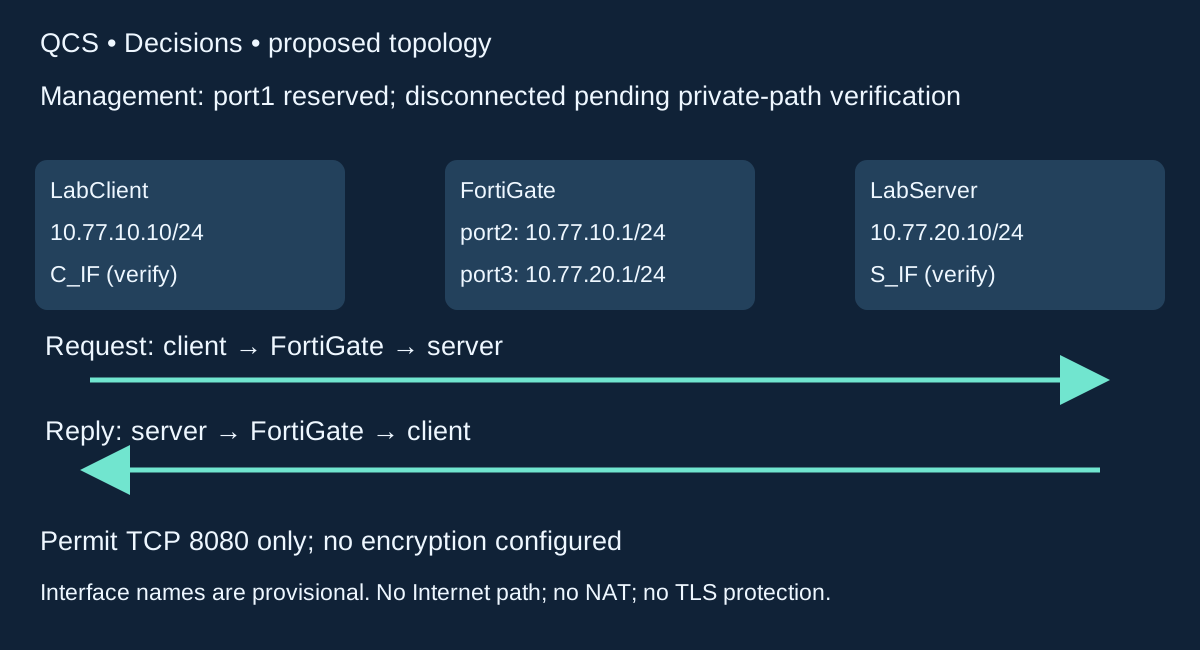
Source 10.77.10.10/32 → destination 10.77.20.10/32; incoming verified port2, outgoing verified port3; TCP destination 8080.
If the narrow permit matches a new request, FortiGate can forward it. Delivery still requires routes and a running listener.
A different service does not match that permit. In the specified baseline, unmatched new forwarded traffic is denied. This is a prediction, not an observed deny test.
Server → port3 → port2 → client, if it matches the permitted session and the return path works.
Slow packet explorer • inspect one hop at a time
Start paused. Choose any step, use Previous/Next, or play at your chosen pace. Keyboard: Tab to controls, then Enter/Space; arrow keys work in the native selectors. This is an authored simulation, not a real packet capture.
MAC symbols: C_MAC = client NIC; FG_P2_MAC = client-facing firewall NIC; FG_P3_MAC = server-facing firewall NIC; S_MAC = server NIC. Real names/MACs and build are unverified. ARP cache may already be populated. No NAT or TLS is configured.
10.77.10.10/24
port2 10.77.10.1
port3 10.77.20.1
Full IPs shown in the packet fields
10.77.20.10/24
Concept only; not in lab
Ethernet / local link
IP endpoints / ARP target
Transport header
Decision at this step
Why this happens
What would verify it?
Playing the explorer advances teaching steps only. It sends no network traffic and changes no lab settings. Forward/return lanes summarize packet direction; timing is instructional, not measured latency.
Complete step reference — readable without JavaScript
1. Decide whether the server is local
Ethernet: No frame sent yet
IP / ARP: 10.77.10.10 → 10.77.20.10
Transport: Planned TCP: 49152 → 8080
Decision: Endpoint route lookup, before the firewall
Why: The destination is outside the client /24. Use the route via 10.77.10.1; do not ARP for the remote server.
Evidence: Client: ip route get 10.77.20.10; this predicts a path without sending a request.
2. Find the gateway on the client link
Ethernet: C_MAC → ff:ff:ff:ff:ff:ff
IP / ARP: ARP asks: who has 10.77.10.1?
Transport: ARP has no TCP/UDP ports
Decision: Local ARP broadcast; not a forwarded TCP session
Why: With an empty neighbor cache, the client first needs the gateway MAC. This broadcast stays on the client segment.
Evidence: Client: ip neigh show. A cached valid entry may mean no new ARP request appears.
3. Gateway answers the ARP request
Ethernet: FG_P2_MAC → C_MAC
IP / ARP: ARP reply: 10.77.10.1 is at FG_P2_MAC
Transport: ARP; no TCP flags
Decision: Gateway is the local link destination
Why: MAC names here are symbols, not captured addresses. Record actual MACs privately before comparing a real trace.
Evidence: An ARP reply proves local neighbor resolution, not permission to reach the application.
4. Send the new TCP SYN to FortiGate
Ethernet: C_MAC → FG_P2_MAC
IP / ARP: 10.77.10.10 → 10.77.20.10
Transport: TCP SYN; 49152 → 8080
Decision: Ingress: verified port2
Why: The Ethernet destination is the gateway; the IP destination remains the server. Port2 receives a forwarded flow, not a login to FortiGate.
Evidence: Compare client route, source IP and bounded curl start time; actual client port will vary.
5. Evaluate the new flow
Ethernet: Ingress Ethernet header terminates here
IP / ARP: 10.77.10.10 → 10.77.20.10
Transport: TCP SYN; 49152 → 8080
Decision: Find a route and matching narrow policy; record session state if permitted
Why: The rule must match incoming/outgoing interfaces, client /32, server /32, TCP 8080 and schedule. This is a logical teaching checklist, not FortiOS internal execution order.
Evidence: Instructor correlates policy ID/action and the same tuple/time. A configured permit alone is not runtime evidence.
6. Resolve the directly connected server
Ethernet: FG_P3_MAC → ff:ff:ff:ff:ff:ff
IP / ARP: ARP asks: who has 10.77.20.10?
Transport: ARP; no TCP/UDP ports
Decision: Server-side neighbor lookup if not cached
Why: The outgoing link needs a server MAC. FortiGate does not forward the client-side ARP broadcast into this segment.
Evidence: A cold server-side neighbor cache may cause this separate ARP exchange. Do not clear caches for this lesson.
7. Server answers on its own segment
Ethernet: S_MAC → FG_P3_MAC
IP / ARP: ARP reply: 10.77.20.10 is at S_MAC
Transport: ARP; no TCP flags
Decision: Local server-side resolution
Why: A usable neighbor entry permits frame construction. It does not prove a process listens on TCP 8080.
Evidence: Server listener check is separate: ss -ltn. Expected local address: 10.77.20.10:8080.
8. Forward the SYN to the server
Ethernet: FG_P3_MAC → S_MAC
IP / ARP: 10.77.10.10 → 10.77.20.10
Transport: TCP SYN; 49152 → 8080
Decision: Egress: verified port3; NAT off
Why: A new Ethernet header is used on the server link. IP source/destination and transport ports are unchanged in this lab.
Evidence: In a real filtered trace, compare ingress and egress IP/port tuples; collect only the authorized local test.
9. Return SYN-ACK to FortiGate
Ethernet: S_MAC → FG_P3_MAC
IP / ARP: 10.77.20.10 → 10.77.10.10
Transport: TCP SYN-ACK; 8080 → 49152
Decision: Server route to 10.77.10.0/24 via 10.77.20.1
Why: The server reply goes to its local gateway MAC. The client is remote; the server does not send an Ethernet frame directly across the router.
Evidence: Server: ip route get 10.77.10.10. No route/fallback means reply delivery can fail before FortiGate receives it.
10. Forward the matching reply to the client
Ethernet: FG_P2_MAC → C_MAC
IP / ARP: 10.77.20.10 → 10.77.10.10
Transport: TCP SYN-ACK; 8080 → 49152
Decision: Match allowed session and usable return path
Why: This is a reply to the initiated session. A new server-initiated connection is a different policy decision.
Evidence: Check the same reversed tuple, not just the shared service port. Session state does not repair endpoint routes.
11. Acknowledge connection setup
Ethernet: C_MAC → FG_P2_MAC; then FG_P3_MAC → S_MAC
IP / ARP: 10.77.10.10 → 10.77.20.10
Transport: TCP ACK; 49152 → 8080
Decision: Client → port2 → port3 → server
Why: The handshake can complete while the later application fails. HTTP request/response is a further observation, taught in lesson 3.
Evidence: TCP setup evidence is weaker than a successful HTTP response. No TLS or VPN is configured.
12. Stop a separate unmatched new SYN
Ethernet: C_MAC → FG_P2_MAC
IP / ARP: 10.77.10.10 → 10.77.20.10
Transport: NEW TCP SYN; 49153 → 22
Decision: No matching forwarding permit in this specified baseline → drop
Why: This new destination port does not match TCP 8080. The animation stops at FortiGate and depicts no server response or invented reject packet.
Evidence: This is a predicted decision only. The practical service-stop fault is a different failure and is never labelled a verified firewall drop.
Slow packet film: 12 steps, six seconds per step (72 seconds total). Pause to inspect the headers, or use the explorer above at 10/15 seconds per step. Film timing is instructional; it is not measured network latency.
No autoplay. Use native pause or leave the static diagram visible. Reusable GIF download. The static diagram and caption are the reduced-motion alternative; GIFs are not embedded.
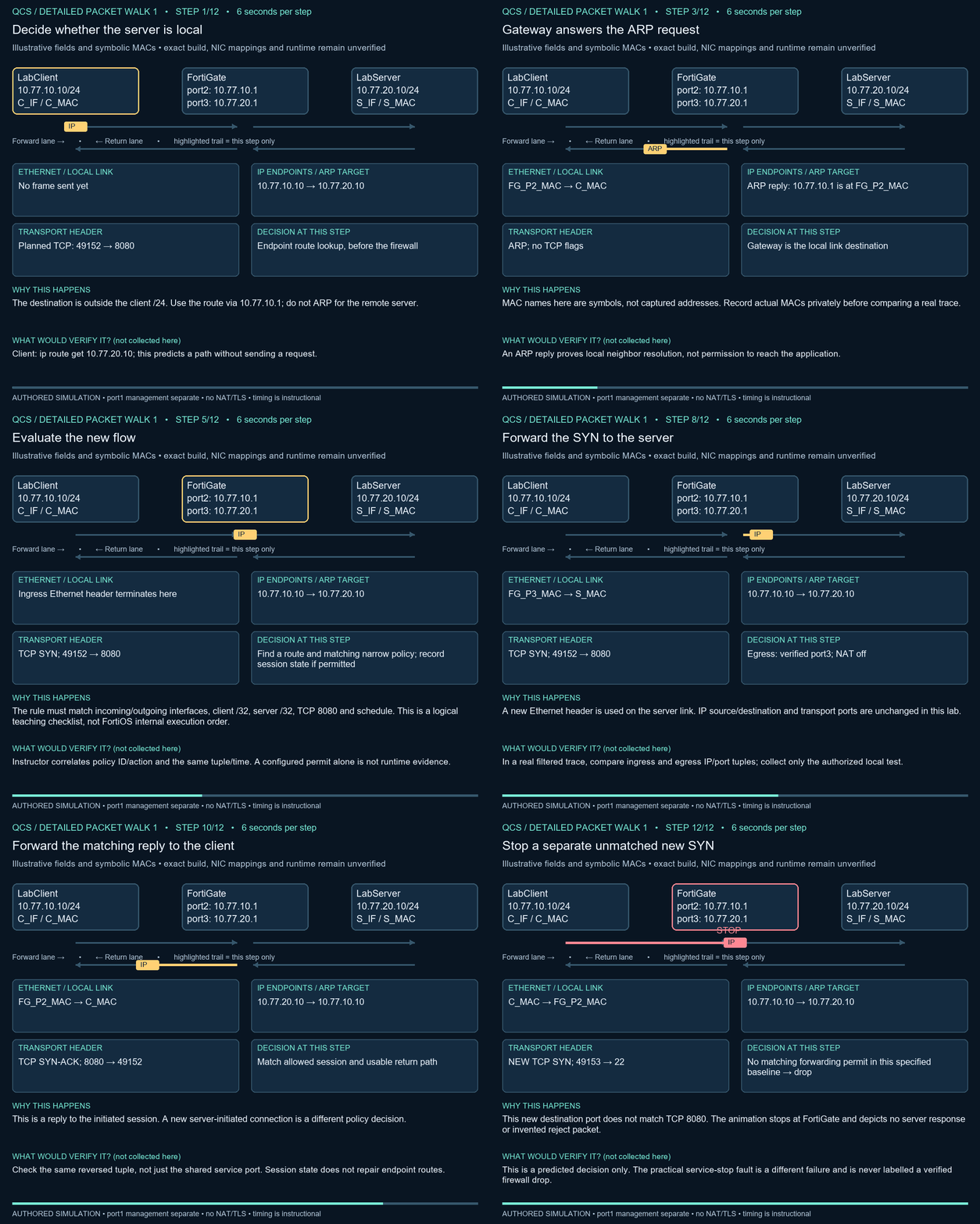
Practical 01 • predict, test, explain
Conditional practical: complete the exact-build setup and baseline gates first. Until then, use this as guided analysis and leave observed results blank.
Prerequisite: the instructor has passed setup acceptance. Otherwise complete the same worksheet as guided analysis only. Estimated study time: 60–90 minutes.
- Write the intended access tuple: 10.77.10.10 → 10.77.20.10, TCP destination 8080, port2 → port3.
- In the server console, start the supplied helper with the command below. It stays in the foreground. In the separate client console run the bounded curl request.
- Expected, not observed here: HTTP 200 and QCS local lab text. Match the time and endpoint tuple to the server request line and instructor’s policy log/session evidence.
- Fault: press Ctrl+C in the server console to stop just the helper. Run one fresh client request. A refusal or timeout now illustrates a service failure, not proof of firewall denial.
- Rollback: restart the same helper and retry. Acceptance: HTTP 200 returns again; rule scope stayed unchanged. Cleanup: Ctrl+C only if finished with the service.
SERVER Ubuntu console:
python3 qcs-http.py

CLIENT Ubuntu console:
curl --noproxy "*" --connect-timeout 3 --max-time 5 --include http://10.77.20.10:8080/
python3 runs the local helper. curl requests a URL; --noproxy "*" avoids proxy dependencies, the timeout options bound waiting, and --include shows the status headers. The numeric URL requires no DNS.
Bounded diagnosis and practice
If the baseline fails: (1) confirm the helper is running, (2) inspect client/server routes as lesson 2 teaches, (3) ask the instructor for the matching policy/log observation. Stop without broadening rules. Practice: explain why a correct rule and a stopped service can coexist; write one permitted tuple; identify the missing evidence in “it timed out.” Suggested answers: rule ≠ listener; use the tuple above; missing route/listener/policy correlation.
Evidence and boundaries
Use the evidence worksheet. Write prediction before observation; record time, exact command, endpoints, policy ID if available and a redacted result. Leave actual-result cells blank until tested. Never paste passwords, license files, serials, full configurations or recovery backups into the preview.
Stop after one failed attempt and up to three focused checks. A timeout alone is inconclusive: service, route, host filtering or firewall policy may be responsible. Restore the stated fault before trying a different hypothesis.
More practice • explain before revealing the answer
Which header names the gateway on the client link?
Ethernet destination FG_P2_MAC. The IP destination is still 10.77.20.10.
Does ARP use TCP port 8080?
No. ARP is a local link-address resolution protocol with no TCP/UDP ports.
A SYN-ACK returned. Has the helper served HTTP 200 yet?
No. TCP setup and HTTP response are separate observations.
Why is a new server-initiated connection different from a reply?
It initiates a different session and needs its own applicable policy decision.
Why can stopping the helper mimic a blocked request?
The client may fail to receive a useful response, even while the network permit remains unchanged.
What should accompany a claimed rule match?
Matching time, source/destination IPs, protocol/ports and actual policy/session evidence, with limits recorded.
QCS Institute · FortiGate foundations
Work through the explanation, inspect each header, then use the lab acceptance checks.