
Network Troubleshooting Case Study
FortiGate ADVPN Failover: Why an Available Backup Tunnel Did Not Restore the Site
Troubleshoot ADVPN failover with BGP over loopbacks: separate SLA targets, inspect kernel routes and verify real traffic paths before changing configuration.
Published by QuantumCrafters Studio
Direct answer
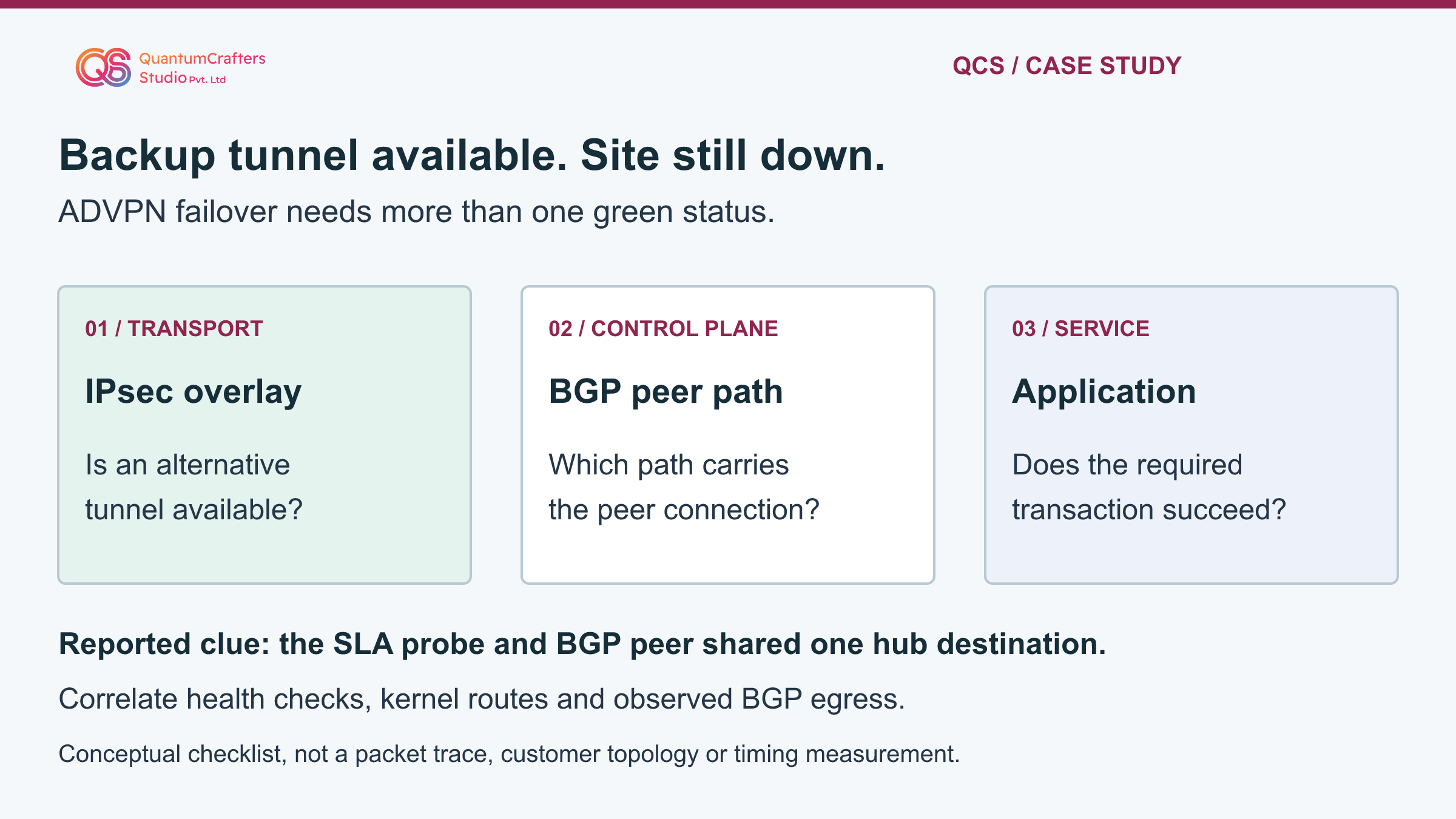
QCS's public account reports an ADVPN site outage in which the SD-WAN health-check destination reused the hub loopback address used for BGP peering. Fortinet documents that probe-related kernel routes can keep influencing that peer's path after a failed health check. The reported correction separated the health-check target from the BGP peer address.
Diagnose this condition by correlating member health, BGP state, routing and observed egress; a tunnel-up indicator alone cannot establish working failover.
Key Takeaways
- Tunnel availability, BGP establishment and application recovery are separate observations.
- Compare the health-check destination with the BGP peer address.
- Inspect kernel routes and actual egress before assigning the cause.
- Use a reachable, representative probe target and test every intended failure scenario.
Terms Used in This Guide
- IPsec overlay and ADVPN
- An overlay is a logical tunnel carried by an underlying network. Auto Discovery VPN can establish shortcuts between spokes. An existing tunnel is only one dependency of usable application connectivity.
- BGP control plane
- Border Gateway Protocol exchanges reachability information between peers. Its own connection needs a working network path; this is distinct from the application traffic that uses learned routes.
- Loopback interface
- A logical interface whose address is not tied directly to one physical cable. That stable identity still needs valid routing and reachability over an available path.
- Performance SLA / health check
- A configured test toward a destination used to assess path availability or quality. The destination, source, protocol and participating members determine what it actually measures.
- Kernel route
- An installed routing entry visible in the operating system's forwarding view. It should be compared with the routing-protocol view and observed traffic, not assumed to tell the whole story alone.
- VDOM and VRF
- Virtual domains and virtual routing contexts separate network state. Evidence from the wrong context can look valid while describing a different traffic path.
The reported problem and what remains unknown
QCS's public account describes a referred site-down incident in an ADVPN 2.0 network with two hubs, multiple IPsec overlays, SD-WAN and BGP peering over loopbacks. A backup tunnel was available, yet the branch did not recover during WAN failover. The investigation compared SLA/member health, BGP neighbors, kernel entries and BGP egress.
It found that the probe destination and hub BGP peer address were the same. The account reports recovery after moving the probe to a separate hub-side loopback.
That is the reported outcome, not a new measured result from this article. The public post does not disclose the customer's exact FortiOS build, complete topology, routing policy, timers or convergence measurements. No FortiGate, GNS3 or networking lab was operated for this guide.
The diagrams are original conceptual teaching aids, not a reconstruction of the customer's two-hub design. The operational worksheets and proposed checks below add practical structure without pretending those missing details are known. [1]
Technical mechanism: why the destination's role matters
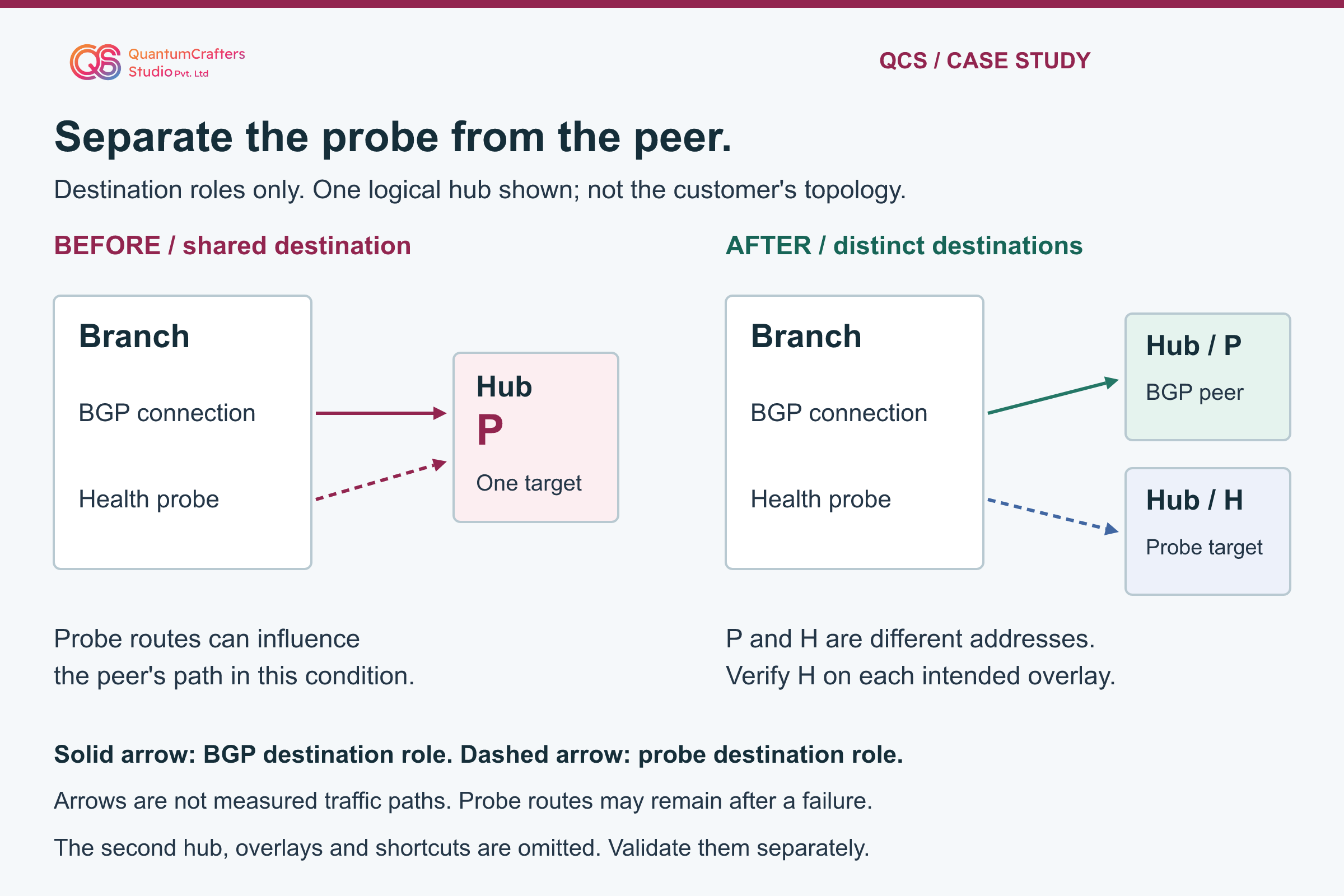
Fortinet's staff guidance for FortiOS 7.0 and later explains a specific BGP-over-loopback and SD-WAN interaction. Probe destinations receive kernel routes over the participating members. Those routes remain for probing even when a health check fails. Reusing that destination for the hub BGP peer can therefore leave BGP using its previous tunnel rather than the available alternative. The documented design separates the health-check destination from the peer address.
A useful mental model has three questions. Is there usable transport? Can the routing peers communicate on the intended path? Can the required application complete its transaction? Passing one question does not answer the next. This is a troubleshooting framework, not a universal internal packet-processing order.
Do not generalize the finding into 'loopbacks are unsafe' or 'ADVPN 2.0 is broken'. A loopback is a stable identity, not a promise of reachability. This case concerns the relationship between two destination roles. The same outward symptom could also arise from a different peer source, routing policy, an unavailable application or another dependency. Test the hypothesis against the actual evidence. [2][5]
Step-by-step runbook: map one failing service before changing anything
Step 1: Confirm authorization, incident owner and an affected business transaction. Record branch, hub, VDOM/VRF, exact build and the time of the failure. Name the original and alternate overlays without publishing customer addresses. Record whether management access traverses the same network being investigated.
Step 2: Preserve a supported configuration backup and an independent recovery path. Agree a maintenance window before deliberately interrupting any link. Do not disable interfaces, clear tunnels or reset BGP merely to collect a more convenient screenshot. If the current outage already provides the failure condition, collect observations without adding another disruption.
Step 3: Build a destination-role worksheet. For each hub, record the BGP neighbor address, local peer source, probe destination, probe protocol, source address and participating SD-WAN members. Compare the actual values, not just similarly named objects. Mark whether two roles share one address. Distinguish what is configured from what is currently observed.
Step 4: Create a timestamped baseline for tunnel state, member/SLA status, BGP state, route toward the peer and an approved application check. Store evidence privately and label gaps. Missing data must stay 'not observed', not become a zero-loss or successful-failover claim. [2][3]
Observational commands: collect state without forcing a failover
Use the authorized FortiGate console, not a desktop command prompt, and confirm the administrative context first. The command cards below are inspection examples supported by the linked documentation. Syntax and available output vary by release. Use the installed build's help and stop on an unavailable command or permission error; do not grant yourself wider access.
Step 5: Compare health-check results with BGP state and the route toward the actual peer. A live member does not prove the intended SLA rule or application route is selected. BGP establishment alone does not establish that the required prefix is present. Examine the particular destination and service named in your incident record.
Step 6: If authorized, capture a bounded sample of BGP traffic with a narrow peer filter. Interface labels and source/destination addresses help test the egress hypothesis. A packet capture is observation, not a reason to reset a working peer. Never leave a capture running indefinitely while waiting for traffic. Treat addresses, topology and packet metadata as sensitive operational information.
For a large route table, prefer the target-specific routing query first. Review the kernel view only when it is needed to distinguish protocol routing from installed probe-related entries. Save the relevant excerpt privately; do not paste the entire routing table into a public ticket or online tool. [4][7][6]
FortiGate observation worksheet
Run one check at a time in the authorized FortiGate console and correct VDOM/VRF. Replace <BGP_PEER_IP> with the actual peer IPv4 address; never paste the angle-bracket label literally. These examples are not tested customer output.
Keep outputs private and sanitize addresses, names and topology before sharing. No tunnel reset, BGP clear, configuration edit or continuous debug is included. The capture is bounded by packet count, not elapsed time.
FortiGate: inspect configured probe results
diagnose sys sdwan health-checkLook for: Match the named check and member to the incident worksheet. Record alive/dead state, measured quality and SLA status without assuming they validate application service.
Does not prove: A healthy probe proves only its configured measurement. It does not establish BGP reachability, the selected application rule or the return path.
Finish: This is a snapshot. Stop if the command differs on this build or your role cannot inspect the required context; consult the installed-version documentation.
Vendor reference for this observationFortiGate: inspect peer state
get router info bgp summaryLook for: Find the intended peer and record its state and prefix information. Compare this result with the same timestamp's route and probe evidence.
Does not prove: An established neighbor is not proof that the required application prefix is present or that the application can communicate in both directions.
Finish: Save the relevant excerpt privately and return to the prompt. Do not clear or restart a neighbor to make the output look different.
Vendor reference for this observationFortiGate: inspect the route toward the peer
get router info routing-table details <BGP_PEER_IP>Look for: Compare the selected route and interface with the intended healthy overlay and peer source. Repeat in the same routing context as the incident.
Does not prove: This routing view is not a packet capture. It must be compared with installed kernel state and observed egress when the views appear inconsistent.
Finish: Replace the peer label before running. If there is no matching route, record that result and investigate; do not insert an unreviewed static route.
Vendor reference for this observationFortiGate: inspect installed routing entries
get router info kernelLook for: Identify entries for the actual probe destination and BGP peer. Relate their interfaces and source constraints to the destination-role worksheet.
Does not prove: The existence of a probe-related route after failure can be expected. It does not alone prove that this route caused the application's outage.
Finish: Output can be large; use only when needed and save only relevant excerpts privately. Do not delete kernel entries or alter route priorities during collection.
Vendor reference for this observationFortiGate: observe a bounded BGP traffic sample
diagnose sniffer packet any 'host <BGP_PEER_IP> and tcp port 179' 4 30 lLook for: After replacing the peer label, inspect interface names, direction and peer addresses. Verbosity 4 includes interface information; 30 limits matching packets.
Does not prove: Thirty packets is not a time limit. No matching packets may leave the command waiting; absence of captured traffic is not by itself proof of an outage.
Finish: Press Ctrl+C after at most 15 seconds or sooner if sufficient evidence is collected; otherwise it ends after 30 matching packets. Do not change offload settings or leave it unattended.
Vendor reference for this observation
Decision point: confirm the cause instead of forcing the case to fit
The shared-destination hypothesis is credible when the configured peer and probe destination match, the observed failure is consistent with the vendor-described path behavior, and the route/capture evidence supports that relationship. If the addresses already differ or BGP is using the expected healthy overlay, investigate another cause rather than making a cosmetic loopback change.
Check peer source and interface constraints as a separate branch of the investigation. Fortinet documents that update-source chooses the source address while an interface setting can constrain where a neighbor is expected. Inspect these settings against the approved design; do not simply remove them. A received packet on an unexpected interface may be important evidence, but is not an automatic instruction to relax the configuration.
Write the working conclusion as a falsifiable statement: which observation would contradict it, and what would remain broken after the proposed correction? For example, restoring BGP but not the required application would mean the incident is not fully resolved. This discipline prevents a clean control-plane screenshot from hiding an ongoing service outage. [5][7]
Recommended implementation: separate probe and peer roles carefully
For a confirmed shared-target condition, design a distinct reachable probe endpoint appropriate to the intended test. QCS's source reports a separate hub-side loopback; that is one implementation, not a requirement to copy an undisclosed customer address. Do not replace the probe with an arbitrary public host that measures a different service path. Keep the BGP peer identity unchanged unless the approved design separately requires its migration.
Step 7: Before changing the probe destination, verify ownership of the new address, protocol response, source selection and return reachability over each intended overlay. For an unnumbered tunnel, source selection needs particular attention; the vendor example explicitly supplies the source for its probes. Do not copy its sample addresses into production. Check the applicable access controls without opening unrestricted management access.
Step 8: Inventory every health check and SD-WAN rule that depends on the object. Approve a scoped edit, record the old values and preserve the unrelated members, thresholds and routing policy. Use the exact release's supported workflow, read back the saved result, and verify the new endpoint before broader rollout. A valid configuration is not proof of a responsive target.
For dual hubs, repeat the role and reachability checks for each hub independently. A passing test toward one hub does not validate the other hub or a spoke-to-spoke shortcut. The diagram below intentionally shows destination roles for one logical hub only. [2][3]
Validation: follow the evidence all the way to the application
Agree an explicit test matrix and outage budget with the service owner. Cover the healthy baseline, each approved single-overlay failure, restoration and any separately approved hub failure. Do not cause a second fault while the first has not recovered. Assign an observer, recovery owner and stop condition for each test. Planned tests are not evidence until they have actually been executed.
For each row, record health-check behavior, BGP neighbor state, route toward the peer, observed BGP egress and the required application result in both directions. Check return-path behavior from the appropriate other end. A tunnel-up indicator alone is insufficient. Confirm the intended branch prefixes and policy behavior rather than assuming that an established session carries all required routes.
Measure interruption only with real timestamps and a defined transaction. Distinguish a new application connection from a pre-existing session, and record either as untested when appropriate. Do not publish a convergence-time promise based on this case; no timing measurement is provided. Probe routes may legitimately remain after failure. Their mere existence is not the criterion for failure: evaluate their destination role and the observed path.
After restoration, verify that the network returns to its intended steady state without flapping. Keep the evidence matrix and residual limitations with the change record. If only the control connection has recovered, leave application validation open. [4][2][1]
Rollback, limitations and escalation
Define recovery before editing. Preserve the old configuration, but do not automatically reinstate a known harmful shared destination during an outage. If the new probe is unreachable or service health worsens, stop further rollout and let the incident owner select the safest supported recovery using the recorded baseline. Restore only the agreed scope; a full-device restore can overwrite unrelated work.
If the evidence does not match this mechanism, broaden the investigation with the responsible engineer. A source-address mismatch, different route selection, tunnel negotiation problem or application-side failure needs its own proof. The diagnostic cards deliberately exclude tunnel resets, BGP clears and continuous debug. Those are not beginner-safe substitutes for a reasoned hypothesis.
Escalate with exact builds, a sanitized topology, destination-role worksheet, relevant route and capture excerpts, the tested failure condition and the observed result. Keep credentials and complete customer configuration out of public channels. The reusable lesson is to validate transport, control plane and service separately. QCS can assist with the investigation, but neither a new loopback nor a single command guarantees recovery in every ADVPN design. [7][6]
Practical Checklist
Confirm the affected service, authorization and exact build/context.
Preserve a supported backup and independent recovery access.
List BGP peer, probe destination, source and members for each hub.
Compare peer and probe addresses rather than object names.
Record tunnel, SLA, BGP and routing observations with timestamps.
Use a narrow bounded capture only when authorized.
Test the hypothesis against contradictory evidence.
Verify new probe reachability and return path before rollout.
Approve and read back a narrowly scoped change.
Validate each intended failure scenario and application direction.
Record rollback triggers, actual timings and any untested conditions.
Questions Teams Ask
Can the backup IPsec tunnel be up while the site remains down?
Yes. Available transport does not by itself prove peer reachability, correct routes or application recovery. Check those observations separately. [1]
Should I use the BGP peer address as the SLA target?
For the BGP-over-loopback design described by Fortinet, use a different health-check destination. First confirm the actual architecture and the new target's source, reachability and return path. [2]
Must I remove kernel probe routes after a failed health check?
No. Their continued presence can support ongoing probing. Do not delete routes manually as a shortcut; determine whether destination reuse is influencing the peer's actual path. [2]
Does this guide prove the customer's exact failover time?
No. The original outcome is source-reported and no appliance runtime was performed here. The proposed test matrix tells operators what to measure, not what an untested deployment will achieve. [1]
Sources and Further Reading
Sources and Technical Scope
This guide draws on the technical references cited above and explains their practical implications for network and security teams. Diagrams are illustrative. Check applicability against your device model, software release and environment before making changes; documentation-based guidance is not evidence of a completed appliance or laboratory test.