
Security Operations
Fortinet October 2026 Hardening Release: A FortiGate Upgrade and Verification Guide
Understand Fortinet's October 22 hardening release, affected FortiOS branches, upgrade precautions and practical checks before closing the change.
Reviewed by Harvey (independent Codex reviewer)
Resource outcome
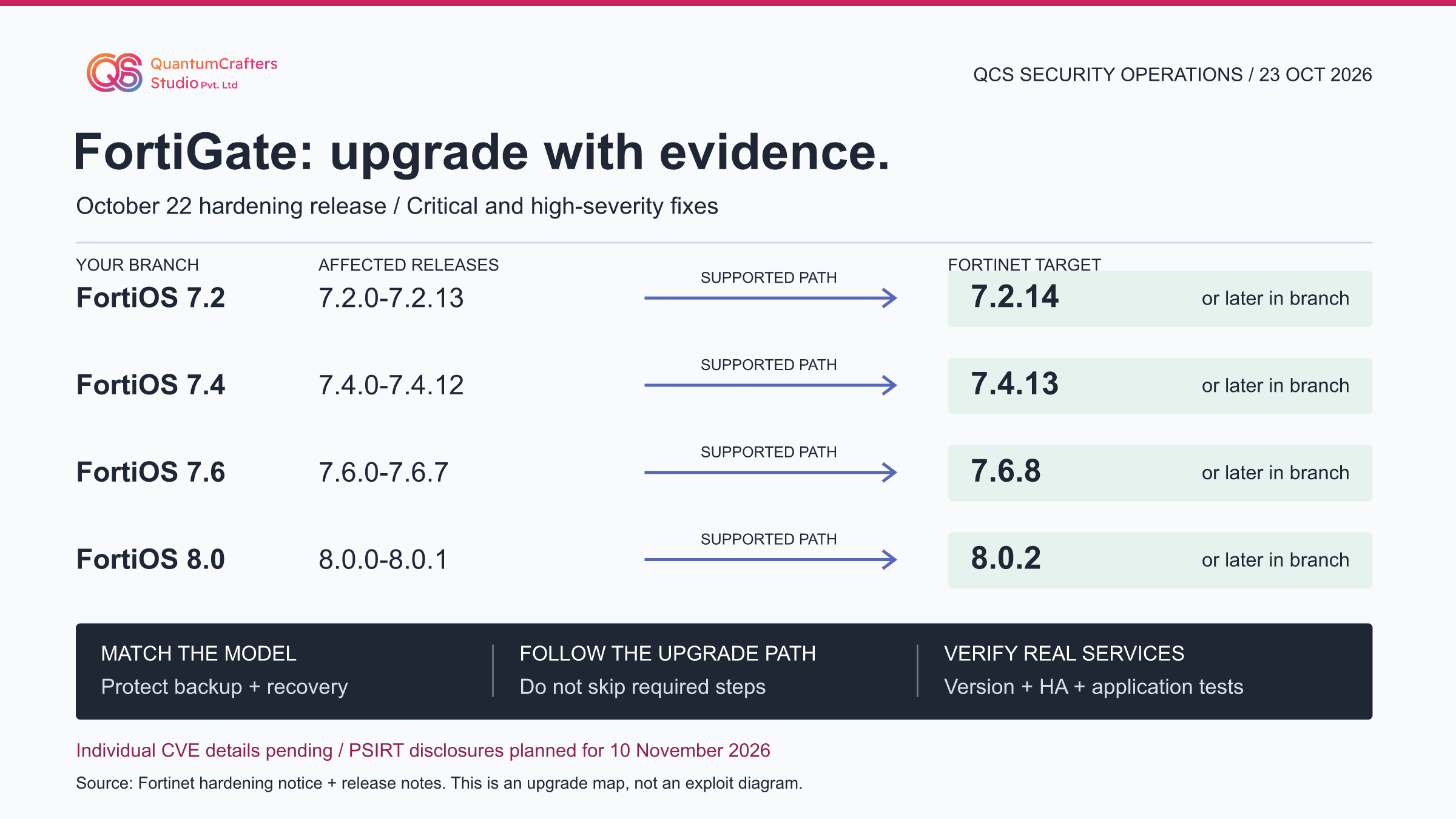
Fortinet has announced critical and high-severity fixes in its October 22, 2026 security-hardening release. Its FortiOS targets are 7.2.14, 7.4.13, 7.6.8 and 8.0.2 or later within the appropriate supported branch. Prioritize exposed systems, but verify model compatibility and the supported upgrade path first.
The announcement does not disclose individual CVEs, CVSS scores or exploitation prerequisites; it schedules detailed PSIRT advisories for November 10. Do not describe this notice as proof of an actively exploited zero-day.
Key Takeaways
- Treat this as a multi-fix hardening release, not a fully disclosed single CVE.
- The fixed release number is a destination, not permission to skip upgrade-path steps.
- Administrative exposure restrictions reduce risk but do not replace firmware remediation.
- Verify firewall services and recovery readiness independently of the firmware-version check.
Terms Used in This Guide
- FortiOS
- The operating system running on FortiGate appliances and virtual firewalls. A FortiOS version is not a FortiManager or FortiAnalyzer version.
- Hardening release
- A software release that reduces security weaknesses. Here, the vendor describes multiple fixes before publishing their individual vulnerability details.
- Management plane
- The interfaces and services used to administer the firewall, distinct from the user traffic that the firewall forwards.
- Supported upgrade path
- The vendor-approved sequence of firmware versions for a specific model and starting release. It can contain intermediate upgrades.
- HA
- High availability: multiple devices cooperate to keep a service available. Firmware and configuration must be checked on every relevant member.
- MTU and MSS
- MTU is the maximum packet size a link can carry without fragmentation. TCP MSS is the maximum TCP data size advertised for a segment; tunnel overhead reduces the space available.
1. Scope: what Fortinet announced
Fortinet's October 21 notice announced a coordinated October 22 release for FortiOS, FortiManager and FortiAnalyzer, following updates for FortiMail and FortiAuthenticator. It describes critical and high-severity fixes identified through AI-assisted security testing. This is the source of urgency, not evidence that QCS has observed an attack. FortiGate is the firewall product; FortiOS is its operating system. The same-looking version number in another product does not establish equivalent coverage.
For a small company, the practical issue is deciding what can safely be changed today without losing the network needed to recover it. For a managed service team, it is proving that every relevant customer device has an owner and a verified result. This guide focuses on FortiOS; related management products still need separate product-specific change records. [1]
2. Technical evidence and what remains unknown
The announcement supplies affected release ranges and target versions but not individual vulnerability identifiers, attack prerequisites or a complete technical mechanism. It does not establish whether a particular flaw requires authentication, reaches a specific daemon or has been exploited in the wild. It also does not provide an individual CVSS score to attach to this release.
QCS therefore does not invent an exploit chain, label all installations compromised, or turn an absence of exploitation information into a statement that exploitation is impossible.
Fortinet plans the detailed PSIRT advisories for November 10, 2026. Use that as a disclosure checkpoint, not a reason to postpone a supported upgrade. Existing October 13 advisories, including the earlier FortiManager/FortiAnalyzer SQL-injection notice, are distinct records and must not be silently relabelled as this new hardening release. Until the detailed mapping appears, track the update by product, branch, version and the vendor announcement. [1][11]
3. FortiOS affected ranges and release targets
The following four rows come from the hardening announcement. The corresponding official release-note introductions were also read on 23 October. Their general builds are 1778 for 7.2.14, 2933 for 7.4.13, 3744 for 7.6.8 and 0251 for 8.0.2. A model-specific image, special build or unsupported appliance needs its own vendor check. These rows are not an upgrade sequence and do not authorize jumping straight to a target.
If your model cannot run a listed target, preserve that as an unresolved applicability item and obtain supported migration guidance. An omitted older branch is not proven unaffected. Do not move every device to 8.0.2 simply because its number is highest; compatibility, feature support and the model-specific upgrade path still govern the change. [1][2][3][4]
- FortiOS 7.2: 7.2.0-7.2.13 is listed as affected; target 7.2.14 or later in the applicable supported branch.
- FortiOS 7.4: 7.4.0-7.4.12 is listed as affected; target 7.4.13 or later in the applicable supported branch.
- FortiOS 7.6: 7.6.0-7.6.7 is listed as affected; target 7.6.8 or later in the applicable supported branch.
- FortiOS 8.0: 8.0.0-8.0.1 is listed as affected; target 8.0.2 or later in the applicable supported branch.
4. Response choices: reduce exposure while preparing the fix
QCS recommends two workstreams: reduce unnecessary administration exposure and prepare the supported firmware change. A management interface is the HTTPS or SSH service used to configure the firewall. Blocking that service from an untrusted network is different from changing the firewall rules for ordinary forwarded traffic. Do not assume that tightening one transit rule removes all access to the firewall itself.
Fortinet recommends trusted administrative sources, out-of-band management where practical, and MFA for administrators. Out-of-band means a management path separate from the production traffic path. Before changing access, prove a second authorized recovery route so that the change does not lock out the operator.
Virtual patching or an upstream control is a compensating measure only when its applicability is confirmed; this notice does not identify a universal signature that covers every fix. These controls reduce exposure, not the need for the software update. [1]
5. Implementation runbook: establish a trustworthy baseline
Start a change record before touching firmware. Record the appliance or VM model, operating version and build, HA role, management owner, management reachability and critical services. Include public-cloud virtual firewalls: a marketplace listing is not evidence that an existing VM has already changed. Keep serial numbers, configuration backups and topology details in restricted operational records, not in public screenshots or social comments.
An authorized operator can open the FortiGate CLI through the approved console or management connection and run the read-only command get system status. Record the Version field and compare it with the dashboard. Do not paste output containing identifiers into public tools.
For an HA deployment, inventory the other member as well; checking the currently active member alone leaves an evidence gap. Record baseline observations of routing, tunnel health, CPU, memory and the business applications your change will affect. [9][10]
- Expected result: a device list with an owner, current release, proposed target and explicit upgrade-path reference for every unit.
- Stop condition: unknown model, inaccessible HA member, unresolved license or image entitlement, or no reliable recovery access.
6. Implementation runbook: protect recovery and follow the supported path
Export and protect a current configuration backup using the procedure for the installed version. Check that the backup is readable by the responsible team and that any encryption password is available through the approved secret store. Document the exact pre-change image and the version-compatible restore process.
A backup that nobody can decrypt is not a recovery plan. For VMs, follow the vendor and hypervisor guidance; do not assume a snapshot alone is a supported HA rollback method.
Use Fortinet's Upgrade Path Tool with the actual product model, current release and chosen target. Record each intermediate step it returns, and consult the matching release notes at each stage. Check supported models, integration requirements, special notices and known issues before maintenance approval.
Obtain firmware through an authorized Fortinet channel and verify the vendor-provided checksum and signature guidance. Resolve unexpected validation warnings with support rather than lowering security settings to force installation.
During the approved window, follow the vendor procedure for that device and deployment type. Stop if the observed state differs from the change plan. Do not apply a generic single-device procedure to a Security Fabric, chassis platform or HA cluster. The four target numbers above are not an HA ordering instruction and this article does not promise a zero-downtime upgrade. [6][5][8]
7. Verify the upgrade: version, policy and service evidence
After the restart, repeat get system status and record the installed release. Use get system performance status for a read-only view of CPU and memory, and get system ha status where applicable to inspect member state. These are observations, not an automatic pass/fail script. Compare them with the saved baseline and the requirements for your model.
QCS recommends testing at three levels. First, prove that an authorized operator can still manage the device and an unauthorized source cannot reach an interface that should be restricted. Second, check relevant routes, tunnel state, logging destinations and configuration consistency.
Third, run representative user workflows through the firewall, from their real source networks: DNS resolution, an HTTPS application, a permitted outbound session and a remote-access or site-to-site workflow where used.
A successful ping is only one observation. It does not prove that DNS, authentication, application ports or security inspection work. A green tunnel icon does not prove that large transfers complete. Record the source, destination, expected result, actual result and time of each test. Close the change only when the agreed service criteria pass or an authorized owner accepts a documented exception. [9][10]
8. A specific 7.6.8 test: large transfers across IPsec
FortiOS 7.6.8 documents a default-behavior change under bug 1073893. For large TCP packets entering an IPsec tunnel, the device no longer automatically adjusts TCP MSS in the described behavior. It sends ICMP fragmentation-needed feedback so the sender can adapt packet sizing.
MTU is the largest packet a link can carry without fragmentation; MSS is the TCP data-size limit advertised for a segment. IPsec encapsulation adds overhead, reducing the effective room available for the original traffic.
QCS testing recommendation: compare an approved small request with a representative larger transfer across a tunnel used by the business. If the small request succeeds but the larger transfer stalls, investigate path MTU discovery, ICMP handling and the documented branch behavior instead of declaring the security upgrade successful from ping alone. Restrict capture to an authorized flow and protect captured data.
This is an inference for validation based on the release note, not a claim that every deployment is broken or that QCS reproduced a fault. Do not disable inspection or open all ICMP indiscriminately. [7]
9. Worked example: a branch firewall change record
Consider a hypothetical office with a FortiGate on FortiOS 7.4.12 and a site-to-site VPN to a private business application. The announcement places that version in the 7.4 affected range. The proposed branch target is 7.4.13, subject to model support and the upgrade-path result. This example is a planning exercise, not a claim about a QCS customer or an upgrade we executed.
Before maintenance, the operator records a successful application login, a controlled file transfer, the relevant tunnel state and authorized administration from the management network. The team retains a protected backup and confirms its recovery access. After upgrading, it records the new Version field, repeats the same tests from the same source and confirms expected logging.
If the application fails while ping works, the change remains open. Investigate the affected service path, record evidence and use the agreed escalation or recovery process. Do not transplant the 7.6.8-specific MSS note onto 7.4.13 without corresponding branch evidence. [1][3][6]
10. Limitations, rollback and possible compromise
A newer version does not prove that the firewall was never compromised. Unexplained administrator accounts, unauthorized configuration edits or suspicious access logs require a separate incident-response assessment. Preserve relevant evidence under your incident process and involve the responsible security team before actions that may destroy it. This article provides neither exploit-specific indicators nor a clean-bill-of-health test, because those details are not established by the hardening announcement.
Rollback is an approved recovery decision, not a casual downgrade command. Follow the version- and platform-specific downgrade and restore documentation and the recorded recovery plan. Returning to an affected release can reintroduce exposure; keep compensating controls and an accountable exception owner while resolving the issue.
If no safe route exists, escalate to Fortinet support rather than guessing. Review the detailed November 10 PSIRT publications when available and update the change record with actual CVEs, applicability conditions, fixes and exploitation evidence. No appliance, emulator or lab runtime was executed to produce this guide. [1][6][10]
Practical Checklist
Confirm the model, current FortiOS version/build and accountable operator for every appliance or VM.
Verify HA members and management-system dependencies; do not reuse another product's fixed-version row.
Assess management exposure and verify recovery access before restricting administrative reachability.
Save a protected, recoverable baseline configuration and document the version-compatible restore process.
Record the supported upgrade path for the exact model and starting version, including intermediate steps.
Check image entitlement, integrity, supported models, integration constraints and release-specific notices.
Apply the approved procedure during the maintenance window; stop when observed conditions differ.
Verify installed firmware, HA health, approved management access and representative application tests.
Record rollback or incident-response decisions separately; never infer absence of compromise from patch status.
Revisit the vendor PSIRT disclosures on November 10 and reconcile the actual vulnerability details.
Questions Teams Ask
Is this a confirmed actively exploited FortiGate zero-day?
The announcement does not establish that. It describes security fixes and urgency but does not provide per-flaw exploitation status. The accurate label here is a security-hardening release with detailed disclosures pending. [1]
Must every FortiGate upgrade to FortiOS 8.0.2?
No. The notice provides separate 7.2, 7.4, 7.6 and 8.0 targets. Choose a supported fixed release for the exact model and deployment, using the vendor upgrade path and integration checks. [1][6]
Does blocking internet administration remove the vulnerability?
Do not treat it as a replacement for the software update. Fortinet lists administrative exposure restrictions as temporary risk reduction. The undisclosed fixes may have different applicability conditions. [1]
Are FortiManager and FortiAnalyzer fixed at the same versions?
Not across every branch. Fortinet lists 8.0.2, 7.6.8, 7.4.12 and 7.2.13 as their respective targets, while the FortiOS 7.4 and 7.2 targets are 7.4.13 and 7.2.14. Verify the exact product row and integration support. [1]
Can I close the change after seeing the new firmware version?
Only after the agreed validation also passes. QCS recommends configuration and member checks plus representative service tests, retaining before-and-after evidence. A version check alone is neither an application test nor an incident investigation. [10][9]
Sources and Further Reading
How This Guide Was Prepared
Locally authored on 23 October 2026 from Fortinet's announcement, four target-release introductions, upgrade guidance, CLI documentation and release-specific operational notes. A separate Codex reviewer, Harvey, independently checked the complete article, all 11 listed primary sources and the original image on 24 October 2026 IST. This was a source-based AI review, not Fortinet endorsement or human appliance validation. No paid generation API, appliance upgrade, exploitation test or networking-lab runtime was used.
Technical review: Harvey (independent Codex reviewer), Source-based AI technical review, separate from the author.