
Network Troubleshooting Case Study
Ping Works, DNS Resolves, but Websites Fail: A FortiGate Subnet-Overlap Case Study
FortiGate 120G case study: partial DNS success and a subnet conflict. Compare paths, verify routing context and protect management access during correction.
Reviewed by Harvey, independent Codex reviewer
Direct answer
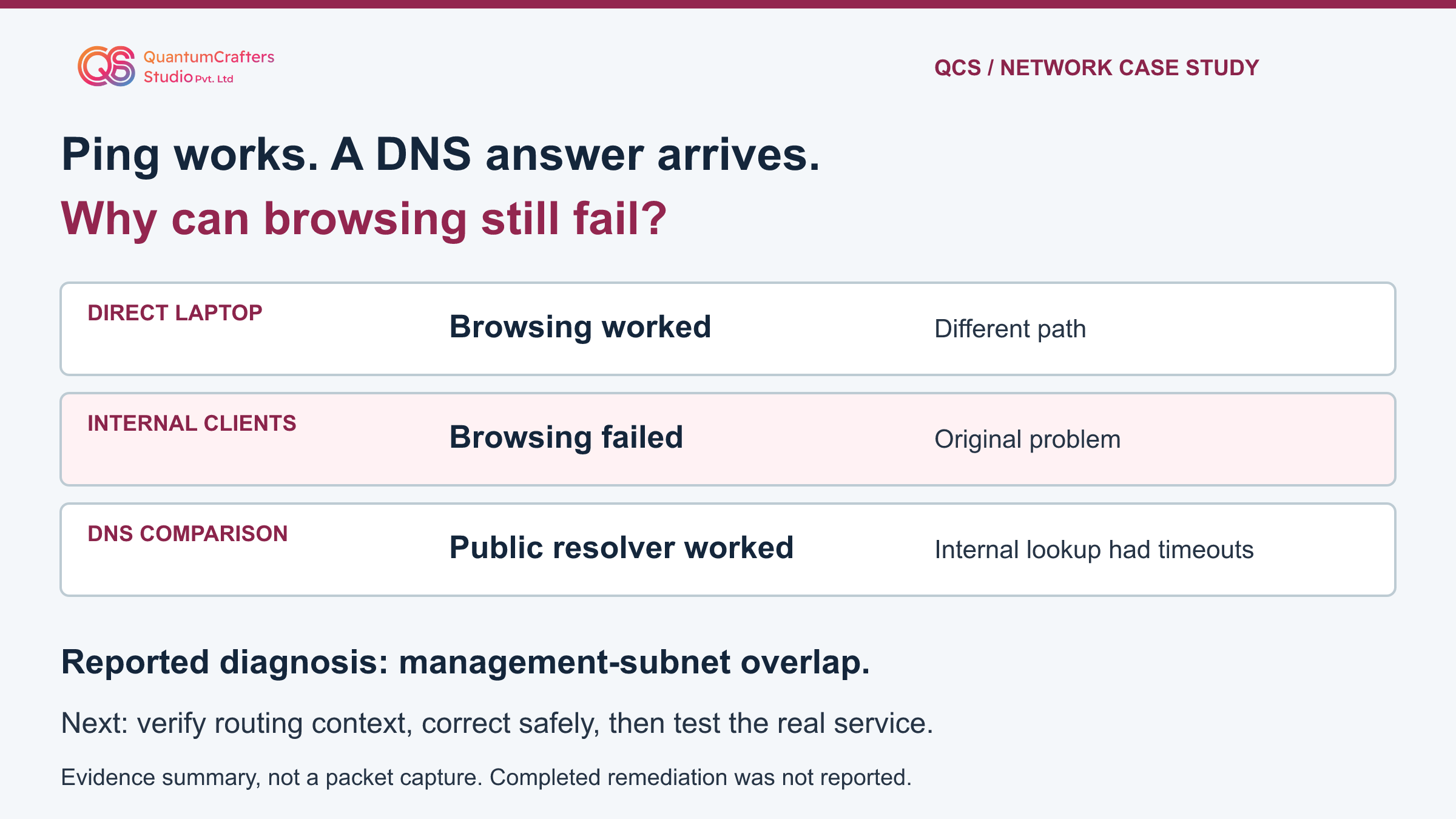
QCS's published FortiGate 120G case identifies a management-interface subnet overlapping the internal DNS network. A directly connected laptop could browse, while existing internal users failed; an approved public-DNS comparison changed the result. The practical response is to verify the actual forwarding and management routing contexts, prove which path the DNS packets take, then correct the conflicting assignment with recovery access and repeat the original service tests.
The source reports the diagnosis and recommended correction, not a completed before-and-after remediation test.
Key Takeaways
- A successful lookup does not establish reliable DNS or successful browsing.
- An interface name is not proof of its routing isolation.
- Prove the actual egress and return path before changing an address.
- Protect administrative access and validate the original business service.
Terms Used in This Guide
- DNS
- The Domain Name System answers questions such as which IP address belongs to a website name. Receiving an answer is only one part of loading the website.
- Subnet and overlap
- A subnet is an IP address range described by a prefix length or mask. Two ranges overlap when they include some of the same addresses; the devices need not have identical IP addresses.
- Route and next hop
- A route describes how to reach an address range. A next hop is the next router used on that path. Directly connected destinations instead require reaching the destination on the selected local link.
- VDOM and VRF
- A virtual domain partitions FortiGate operation. A virtual routing and forwarding instance separates routing tables. Record both where relevant before comparing routes.
- Local traffic and forwarded traffic
- Local traffic starts or ends on the firewall itself. Forwarded traffic passes through it between other devices. These are different tests and can follow different controls.
- ARP and capture
- Address Resolution Protocol discovers an IPv4 neighbor's link-layer address on a local network. A packet capture records traffic visible at an observation point; missing packets require careful interpretation.
The reported problem and the limits of the evidence
During a FortiGate 120G deployment, a laptop directly connected to the firewall could browse, but users on the existing internal network could not. QCS's published account says changing a test client's resolver to public DNS allowed websites to load; using the internal DNS servers brought the problem back. Lookups showed two timeouts before a hostname resolved.
A firewall-originated ping to the internal DNS server succeeded, while the opposite-direction connectivity test failed.
The investigation identified an overlapping subnet on the management interface and attributed the DNS reachability problem to that conflict. The source recommends removing the conflicting assignment with a recovery plan. It does not supply a configuration export, packet capture, installed FortiOS version/build or completed post-change results. No customer addresses, outage duration or measured improvement are asserted here.
This article separates that reported diagnosis from a reusable verification procedure. The suggested tests were not executed on a FortiGate or networking lab during preparation. The original social illustration contains example-looking addressing; it is not treated as a verified customer addressing table. [1]
How the mechanism works: an address range can point to the wrong place
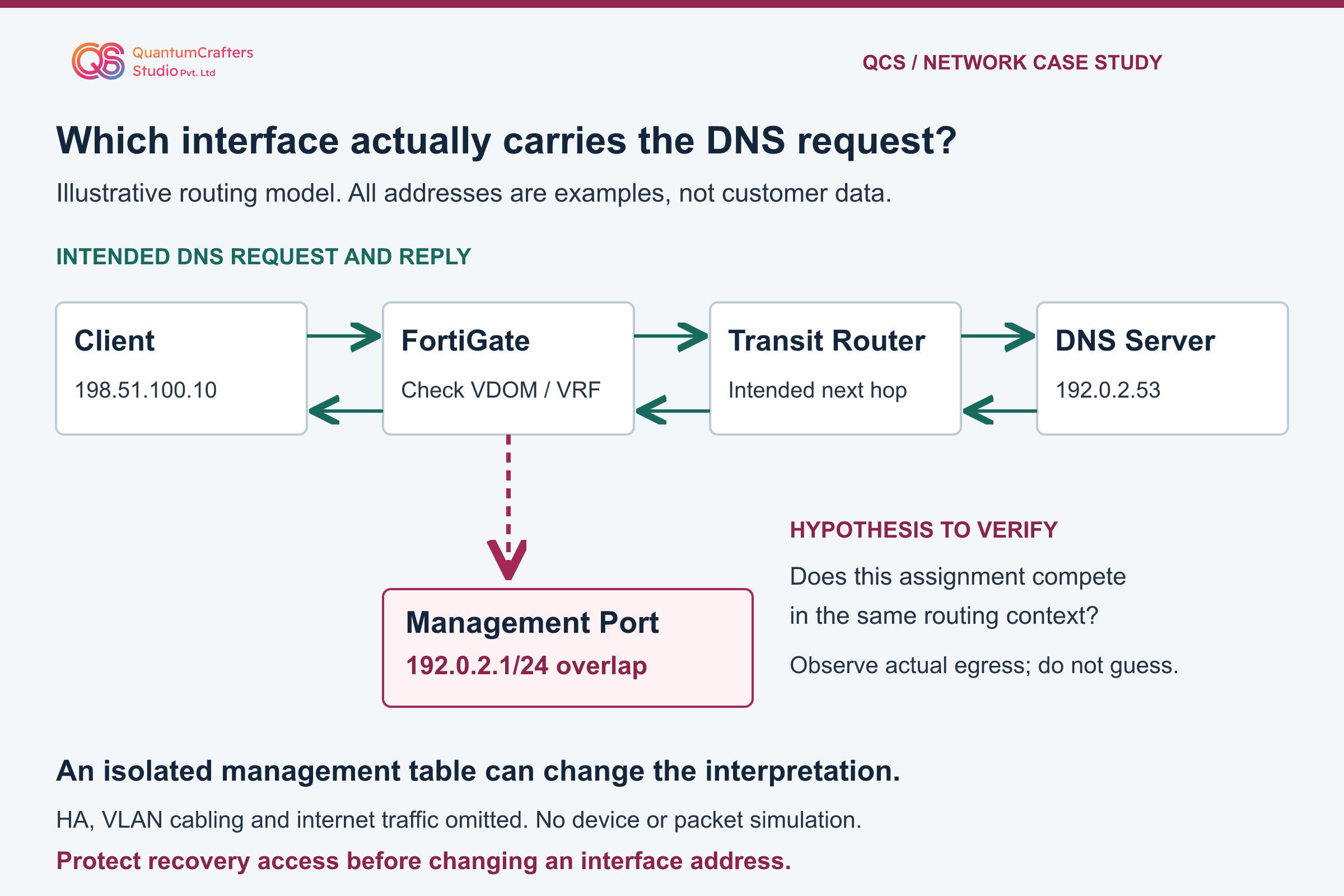
Think of a route as a direction entry, not a promise that the destination is healthy. If a firewall believes a remote server's address belongs on a directly attached interface, it can attempt local neighbor discovery there instead of using the intended transit router. Fortinet warns that overlapping interface ranges can select an unintended interface. The selected path must be observed, not inferred from a port label.
The teaching diagram uses fictional documentation addresses. DNS Server is 192.0.2.53 behind Transit Router. A management assignment of 192.0.2.1/24 overlaps that server range. Client is 198.51.100.10. These are explanatory labels, not configuration to paste into a real network. The red branch is a possible wrong decision only if the relevant routes compete in the same forwarding context and that branch is selected.
Inventory primary and secondary addresses, masks, interface status and intended ownership before calling something a conflict. Different masks can overlap even when the displayed host addresses look different. Do not enable subnet-overlap acceptance to silence a warning: that permits a configuration; it does not prove the design or fix reachability. [2][3]
First decision: establish the management and forwarding context
A physical port named mgmt, the interface option dedicated-to management, the system dedicated-mgmt feature and an HA reserved management interface are not interchangeable. Fortinet distinguishes dedicated-to management from dedicated-mgmt; the latter uses separate management routing on supported models, including the 120G. HA reserved management also has its own configuration behavior. Therefore an address overlap in isolated contexts is not automatically evidence of competing user-traffic routes.
Record the actual mode and VDOM/VRF of each relevant interface. Have an authorized administrator select the correct context before inspecting routes; a beginner should not guess or enter an unfamiliar virtual domain. Compare interface configuration with operational routing and the real topology. In an HA deployment identify which unit you are observing.
Do not switch management modes or move an interface between contexts just to test this article. Those are design changes with dependencies. If you cannot establish where the DNS and client flows are routed, stop before changing anything and involve the network owner. The case's precise management mode was not disclosed, so this guide does not assign one retroactively. [5][6]
Step-by-step runbook: compare one client, resolver and service at a time
Start with permission, an incident owner, a protected configuration backup and working console or out-of-band access. Write down the original client IP, mask, gateway, configured resolvers, VLAN and application error. Record timestamps in one time zone and preserve the initial failure before changing a setting. Choose one approved test client and one non-sensitive hostname.
On Windows, open Start, type Command Prompt and open it. The noninteractive nslookup command below names the resolver explicitly and does not change the adapter's DNS settings. Compare the same hostname and record type against each approved resolver.
Record the responding server, answer and timeouts, not just the final line. On macOS or Linux, use the organization's supported DNS diagnostic utility with an explicit resolver; do not assume the Windows display is identical.
A controlled public-resolver comparison is a contrast, not a permanent fix. Obtain approval before sending queries externally and never send private internal names to a public resolver. Split DNS, browser secure DNS, proxies and caches can make clients appear to test different services.
Keep those conditions documented and consistent. Restore any temporary client setting at the end. Two timeout messages alone do not identify which packet, server or retry failed; retain the transcript and correlate it with traffic evidence. [8][3]
Technical evidence: check the intended egress and return path
Open the approved FortiGate console or authenticated CLI and confirm the unit and VDOM/VRF with its administrator. Inspect the route for the DNS server and the route back to the test client. Compare the chosen interface, prefix and next hop with the intended topology.
Ordinary route output is not a complete simulation of every policy route, SD-WAN rule or existing session; reconcile those features where present. Do not restart routing or clear sessions as a first test.
Inspect ARP only for a genuinely local neighbor or next hop. A routed server beyond another router is not expected to have its own entry on the firewall's local link. Capture one authorized DNS test using a host-and-port filter, a finite packet count and a short time limit.
Compare ingress, egress, requests and replies. Correlate the same client and server addresses; NAT may alter the addresses visible at different points.
An empty capture is not proof of a firewall drop. Wrong context, filters, a path that bypasses the firewall or hardware offload can hide traffic. Do not disable acceleration or security inspection for convenience. Use an approved endpoint or switch observation point, or escalate for a scoped capture plan if visibility is insufficient. The command cards state exactly what each observation does and does not establish. [4][9][10]
Scoped observations, not a paste-in repair
Examples use fictional 192.0.2.53 for DNS and 198.51.100.10 for the client. Replace them only with authorized test endpoints. Confirm installed-release syntax and the unit, VDOM and VRF before using the FortiGate CLI. For every check below, open that actual device's approved console or CLI first; the Windows command belongs on the test client, not the firewall.
Outputs can reveal internal names, addresses, routes and activity. Keep transcripts private. A capture stops after 50 matching packets, not 50 seconds: press Ctrl+C after 15 seconds even if the count is not reached. Stop earlier if device load or management access is affected. No debug daemon, configuration change or payload verbosity is required.
Windows client: ask a specific approved DNS server
nslookup -type=A example.com. 192.0.2.53Look for: Record the named resolver, returned IPv4 answer and any timeout. Use an approved non-sensitive hostname and real resolver instead of these examples.
Does not prove: The answer does not establish browser resolver selection, IPv6 behavior, transport connectivity or successful application loading. This does not change adapter DNS settings.
Finish: This noninteractive query exits when it completes or times out; do not run a continuous loop.
Vendor reference for this observationFortiGate: inspect the DNS destination route
get router info routing-table details 192.0.2.53Look for: In the verified forwarding context, record prefix, route type, next hop and interface. Compare them with the intended DNS path.
Does not prove: This route lookup is not proof of packet delivery or a full policy-route, SD-WAN or existing-session evaluation. A management context may differ.
Finish: Read the finite output and return to the prompt. Do not restart routing or change a route as part of this observation.
Vendor reference for this observationFortiGate: inspect the route toward the test client
get router info routing-table details 198.51.100.10Look for: Compare the return-client route with the real VLAN and gateway design in the same relevant forwarding context.
Does not prove: The firewall's route does not prove the DNS server's own gateway, return path, host firewall or permitted service. Check those independently.
Finish: Save the finite output securely. Leave the routing configuration unchanged during evidence collection.
Vendor reference for this observationFortiGate: examine IPv4 neighbor entries
get system arpLook for: Inspect the expected local neighbor or transit next hop and its interface; compare with the approved topology.
Does not prove: A remote DNS server behind a router is not expected to appear as a directly attached ARP neighbor. An entry is not an application health result.
Finish: Read the output without clearing the table or publishing customer addresses.
Vendor reference for this observationFortiGate: observe a bounded DNS attempt
diagnose sniffer packet any 'host 192.0.2.53 and port 53' 4 50 lLook for: Run one approved client lookup and compare visible requests and replies, interface names and local timestamps. Verbosity 4 prints packet headers with interface names, not payload dumps.
Does not prove: The filter covers conventional port-53 DNS, not encrypted DNS. Offload, NAT, context and paths bypassing the firewall can limit visibility. Missing output does not prove a drop.
Finish: Automatically stops after 50 matching packets. Press Ctrl+C after 15 seconds if still running, and confirm the prompt returns. Do not disable offload or security controls.
Vendor reference for this observation
Why firewall ping, DNS replies and browsing are different tests
A ping sent by the firewall tests a firewall-originated flow. An internal user's lookup tests traffic from that client to a resolver, which may or may not cross the firewall at all. A server pinging a FortiGate address tests traffic terminating on the firewall.
Local-in policy and permitted administrative services affect that last test independently of policies for transit traffic. Thus one-way ping observations warrant investigation but do not prove asymmetric routing.
After resolution, the application still needs its transport, security negotiation and service response. A valid DNS answer does not certify these stages. Equally, a browser may use a cache or its own resolver rather than repeat the command-line test. Keep the hostname, resolved address, client and timestamp together so that the checks describe the same attempt.
Do not broaden an allow rule or disable a host firewall merely to make a test green. If DNS is reliable but the application still fails, move to the actual application's approved logs and connection evidence. Check relevant policy decisions and client behavior instead of repeatedly changing DNS. Avoid interpreting the public case as a universal recipe for every failed website. [7][9]
Recommended correction and rollback: protect administrative access
When configuration and traffic evidence confirm the conflicting assignment, prepare a change with the network owner. Identify the exact interface, current address, routing context and every management dependency. Select an approved non-overlapping management range from the site's address plan, or remove an unused assignment only after its dependencies are checked. Do not copy the teaching addresses.
Before execution, test an alternate console or out-of-band path that does not depend on the interface being changed. Save the previous settings securely and define who will restore them, by which access path, and what failure triggers rollback. Include HA peers, monitoring, administrator access, trusted-host restrictions and upstream management routes in the dependency check. Do not expose management to the internet or weaken access controls to regain convenience.
Apply only the approved correction using documentation for the installed release. The article deliberately provides no universal set-ip or delete sequence: the customer's interface name and mode are unknown. If the planned change would remove your only access, stop and arrange on-site recovery. A temporary return to a known prior setting is an incident-owner decision, not a reason to leave the overlap as the final design. [2][6]
Validation, escalation and the practical takeaway
Repeat the saved failing test from the original internal client with its approved internal resolver. Check both required internal names and approved external names; record response consistency rather than accepting eventual resolution after timeouts. Repeat the route and bounded traffic observations where authorized.
Confirm the intended interface and replies, then open the actual business application and perform its agreed harmless user action. Test another affected client if the incident scope requires it.
Verify administrator access, monitoring and any affected HA management relationship separately. Restore temporary client settings, stop captures, protect evidence and document the final addressing plan. Mark each check pass, fail or not tested, with an observer and timestamp. No measured success, outage reduction or customer remediation completion is claimed by this article.
If the evidence contradicts the overlap hypothesis, preserve it. Escalate with a sanitized timeline, topology, version/build, route excerpts and a narrowly filtered capture, not a full public configuration dump. The useful lesson for IT teams and MSPs is to connect each diagnostic to the exact flow it tests. QCS's reported diagnosis motivates this investigation; your own evidence must determine your correction and closure. [1][3]
Practical Checklist
Confirm authorization, exact device build and incident owner.
Save a confidential baseline and test independent recovery access.
Record client, resolver, gateway, VLAN and application failure.
Establish interface, VDOM, VRF and management mode.
Compare explicit-resolver lookups without leaking private names externally.
Inspect routes for the DNS server and the return client path.
Capture only the authorized flow with count and time limits.
Approve a scoped addressing correction with a usable rollback plan.
Verify DNS, real application use, management access and monitoring separately.
Restore temporary settings, stop captures and record pass/fail evidence.
Questions Teams Ask
Does a successful ping prove that browsing should work?
No. It tests an ICMP exchange for particular endpoints. DNS, the application's connection and traffic terminating on the firewall are different checks with potentially different controls. [7]
Does a management-subnet overlap always affect user traffic?
No. Verify actual routing isolation. Dedicated management, HA reserved interfaces and ordinary interfaces can have different contexts; a name alone is insufficient evidence. [5]
Should users permanently switch to public DNS?
Not on the evidence here. A controlled comparison can help localize a problem, but private naming and organizational DNS controls still matter. Repair the approved service path and restore the intended client configuration. [8]
Was the customer's completed remediation independently tested?
No. The source identifies the conflict and recommends correction, but provides no completed before-and-after result. This is a source-based case analysis and operational guide, not an appliance runtime test. [1]
Sources and Further Reading
How This Guide Was Prepared
Prepared locally from QCS's public case report and primary vendor documentation, then independently reviewed by Harvey, a separate Codex AI reviewer. Teaching diagrams are illustrative, not customer captures. No paid generation API or network-device runtime was used; review does not certify completed customer remediation.
Technical review: Harvey, independent Codex reviewer, Source-based AI technical and visual review; not a device-runtime test.