
Network Troubleshooting Case Study
FortiGate High CPU After an Upgrade: The Layer 2 Loop Behind an Offline Network
A QCS case study: three FortiSwitches and nine FortiAPs offline, high FortiGate CPU, and a Layer 2 loop. Follow safe diagnostics and recovery checks.
Reviewed by Harvey, independent Codex reviewer
Direct answer
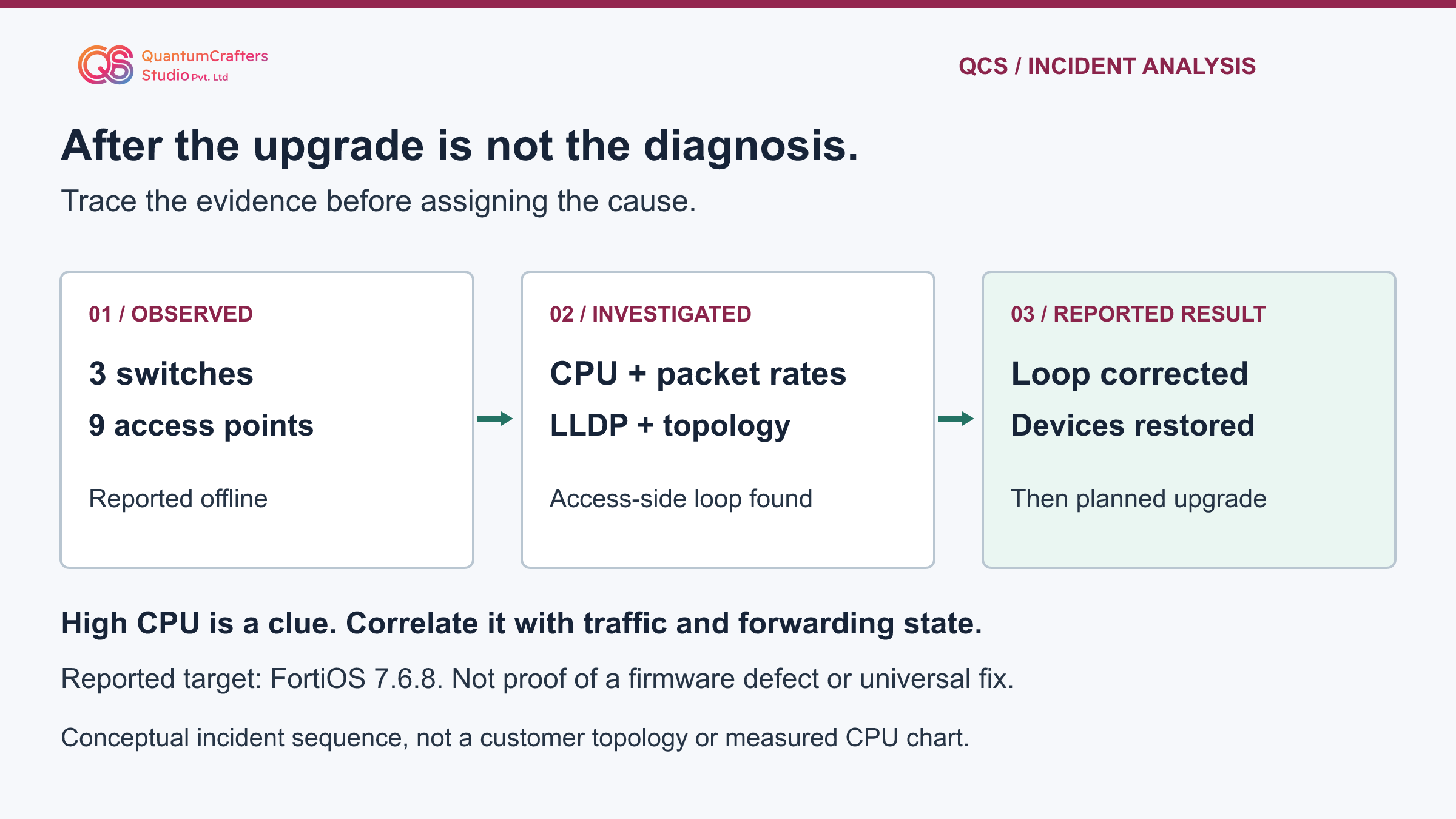
In QCS's reported incident, three managed FortiSwitches and nine FortiAPs appeared offline after a firewall firmware upgrade. High FortiGate CPU led to investigation of packet rates and the switching topology. QCS identified and corrected an access-side Layer 2 loop, reported stable device recovery, and subsequently completed the planned FortiOS 7.6.8 upgrade.
For a similar outage, correlate CPU type, interface traffic, neighbors and spanning-tree state before deciding whether the fault is firmware, management connectivity or switching.
Key Takeaways
- After an upgrade is a timestamp, not a diagnosis.
- High CPU needs classification before selecting the next diagnostic.
- A second cable can be intentional redundancy; prove the forwarding cycle before isolating it.
- Verify both controller visibility and real user traffic after a correction.
Terms Used in This Guide
- Layer 2 loop
- An unintended forwarding cycle in an Ethernet network. Frames can circulate and be copied instead of following a controlled, loop-free path.
- Broadcast storm
- An excessive volume of broadcast traffic that consumes network capacity. A loop can cause it, but a busy interface alone does not prove either a storm or a loop.
- FortiLink
- The Fortinet mechanism through which a FortiGate manages compatible FortiSwitches. Management reachability is distinct from physical power and end-user service.
- CPU and interrupts
- The CPU runs software and handles system work. Interrupt processing responds to events such as received packets; it is different from a busy application process.
- LLDP
- Link Layer Discovery Protocol lets supporting neighbors advertise identity and port information. It helps map connections; it does not prevent loops.
- STP and MSTP
- Spanning Tree Protocol controls redundant Layer 2 paths to avoid forwarding loops. Multiple Spanning Tree Protocol groups VLANs into spanning-tree instances.
- VLAN and PoE
- A VLAN separates an Ethernet broadcast domain. Power over Ethernet supplies compatible devices through cabling; an offline management status is not proof of a PoE failure.
The reported problem, outcome and unknowns
QCS's public summary describes three FortiSwitches and nine FortiAPs showing offline after a FortiGate firmware upgrade. Engineers observed high CPU, checked performance and packet rates, used targeted FortiLink debugging, and reviewed topology and LLDP information. They identified an access-switching Layer 2 loop. QCS reports that isolating and correcting the loop restored all twelve managed devices, which remained stable. The planned FortiOS 7.6.8 upgrade was subsequently completed.
The starting release, intermediate upgrade sequence, device models, precise loop ports, CPU measurements and observation duration were not disclosed. The article does not invent them. In particular, the report does not demonstrate that 7.6.8 created the problem or that a firmware patch removed the loop. The original wording describes an earlier post-upgrade symptom and a later completed target upgrade; it does not identify every intervening firmware step.
The following runbook is reusable QCS guidance, not a reconstruction of private customer logs. The versioned command references are identified individually. Validate syntax and feature support against your installed release and hardware before use. [1][8]
How the mechanism works: a loop can look like a controller outage
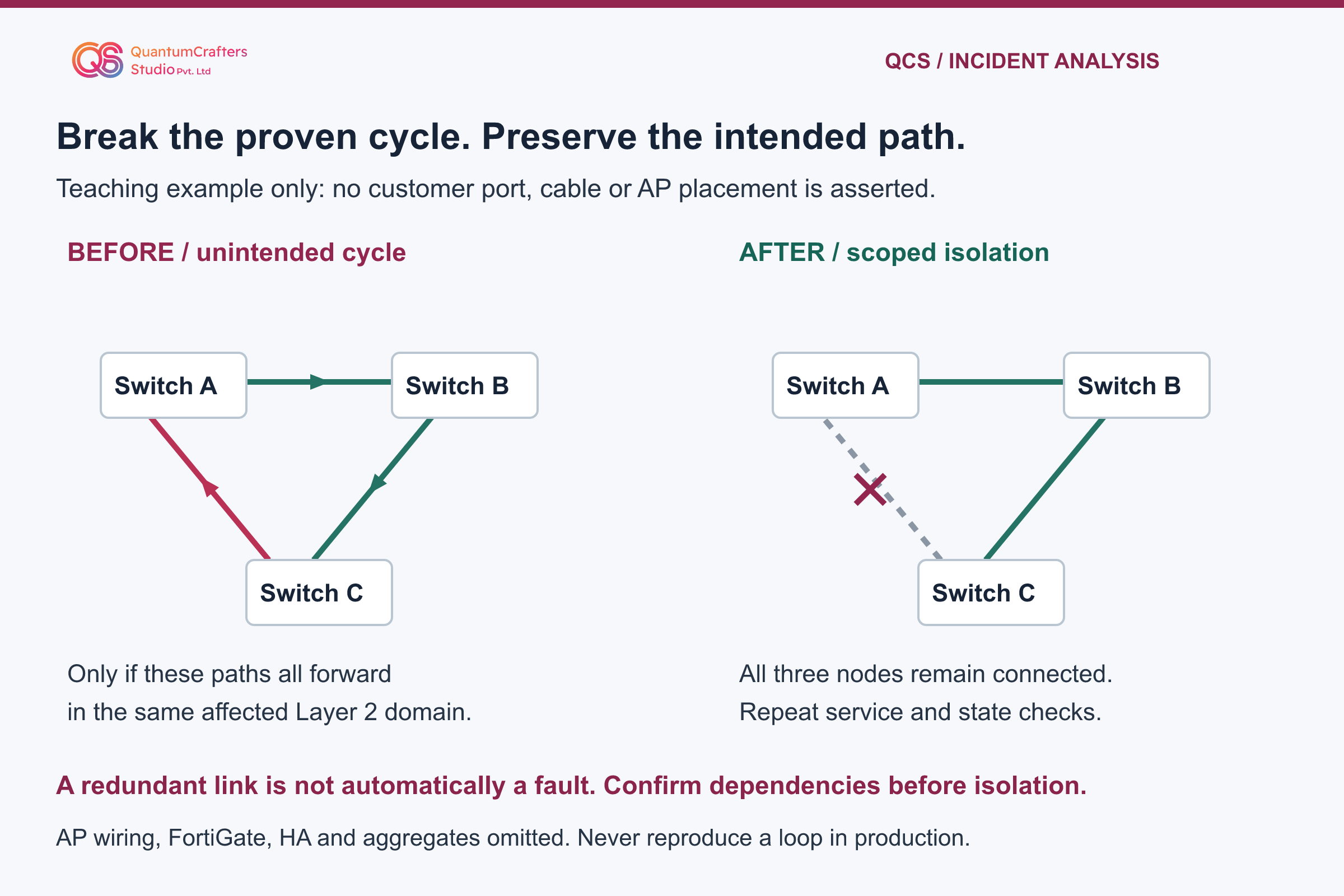
A switch forwards Ethernet frames within a VLAN. If redundant links form an active forwarding cycle without effective loop prevention, flooded traffic can circulate and multiply. A frame does not acquire an IP-style hop limit merely because a switch forwards it. Excessive traffic can consume link capacity and processing resources. The effects may appear at another device, including the firewall managing the switches.
This explains a possible relationship, not a universal symptom pattern. High CPU can also come from busy software processes, legitimate traffic, session churn or other faults. A controller reporting a switch or AP offline means its management relationship is not healthy; it does not establish that the device lost electrical power or that every data path failed.
The teaching topology below uses named example switches, not the customer's undisclosed cables. It deliberately omits AP wiring, HA and link aggregation. The case count of nine APs belongs to the reported impact, not a fabricated diagram assigning three APs to each switch. A correctly engineered redundant topology can be safe; the fault is an unintended forwarding cycle, not redundancy itself. [7][2]
Step-by-step runbook: establish a safe incident baseline
Begin with authorization, an incident owner and a working console or out-of-band management path. Record the time zone, affected services, exact device inventory and firmware versions. Export the relevant configuration using your approved backup process and protect it as confidential. Identify who can approve a physical cable or port change and who can perform it on site.
Create a short timeline: last healthy observation, each firmware or cabling change, first failure, first diagnostic sample and each corrective action. Record facts separately from hypotheses. For example, 'controller shows Switch-A offline at 10:15' is an observation; 'the upgrade broke FortiLink' is a hypothesis requiring evidence.
Do not begin by rebooting every device, clearing counters or applying another upgrade. Those actions can erase useful evidence and enlarge the outage. Preserve the management path and define a stopping condition: if a check raises load or compromises access, stop it and escalate. Never recreate a loop in a production or shared network to demonstrate this article. A disconnected paper exercise is sufficient to understand the diagram. [1][9]
Step 2: classify CPU load and compare interface traffic
Use the FortiGate's overall CPU state and per-core sampling to separate application work from system and interrupt work. Then use the process list where appropriate. A process list by itself is not the whole CPU picture. Save several short, timestamped observations rather than treating one peak as a diagnosis. Do not kill a process because its name appears near the top.
Next inspect incoming and outgoing packets per second across interfaces. Compare the suspected access-side path with its normal baseline and with unaffected interfaces over the same interval. Packet rate and bandwidth measure different things: many small frames can mean substantial processing work without filling the link in bits per second.
An anomalous rate tells you where to investigate, not which cable to unplug. Correlate it with switch port counters, recent changes and the physical map. Legitimate replication or a busy uplink can also have high rates. Preserve counter values and timestamps before any approved reset. The command cards distinguish the console, purpose, exit method and limits of each observation. [2][3][4]
Observational commands, one console at a time
Use an authorized console or SSH session to the named device, in the correct administrative context. Check the installed release's help before running a command. These examples observe state; they do not repair the network. Run short samples, not unattended collection on an overloaded appliance.
Save timestamps and sanitize addresses, device identifiers and customer data before sharing output. Do not invent output or run a command on a different product because its name looks similar.
FortiGate: overall CPU and workload
get system performance statusLook for: Record user, system, interrupt and idle proportions, along with available workload indicators. Repeat a short sample to distinguish a transient peak from persistent load.
Does not prove: The overall figures do not identify the faulty switch or prove a forwarding loop. They select the next investigation.
Finish: A snapshot command returns to the prompt.
Vendor reference for this observationFortiGate: per-core CPU sampling
diagnose sys mpstat 2Look for: Sample at two-second intervals and compare the CPU categories across cores. Preserve a few timestamped samples.
Does not prove: High interrupt work can justify traffic investigation, but is not proof of a loop, attack or firmware defect.
Finish: Press any key to quit, as indicated by the documented command prompt.
Vendor reference for this observationFortiGate: application-process view
diagnose sys topLook for: Identify busy processes when application CPU needs investigation. Press p to sort by CPU in the documented FortiOS 7.6.8 view.
Does not prove: This process list is not the entire system and interrupt workload. Do not terminate a process based on its ranking.
Finish: Press q to return to the normal CLI prompt.
Vendor reference for this observationFortiGate: interface packet rates
diagnose netlink interface packet-rateLook for: Compare incoming and outgoing packets per second on the relevant interfaces with baseline and unaffected paths.
Does not prove: A high rate identifies a candidate path, not a proven faulty cable. Hardware and release behavior must be considered.
Finish: Record the displayed result; do not script continuous polling. If your release behaves differently, consult its CLI help before continuing.
Vendor reference for this observationFortiSwitch: advertised neighbors
get switch lldp neighbors-summaryLook for: On the switch console, compare local ports with advertised neighboring devices and the physical cable map. Reference: FortiSwitch 7.6.2.
Does not prove: No LLDP entry is not proof of no cable. Discovery may be disabled or unsupported, and LLDP does not prevent loops.
Finish: The display command returns to the prompt.
Vendor reference for this observationFortiSwitch: spanning-tree instances
diagnose stp instance listLook for: On the switch console, inspect root, port roles and states for the relevant instance and compare adjacent switches. Reference: FortiSwitch 7.6.4.
Does not prove: One snapshot does not prove every VLAN is loop-free. A discarding redundant port can be correct protection; do not force it to forward.
Finish: The display command returns to the prompt.
Vendor reference for this observation
Step 3: correlate FortiLink, LLDP and spanning-tree evidence
Map each suspected link using both local and remote device names and port labels. LLDP is useful for advertised neighbors; verify the cable inventory as well because an absent neighbor can mean unsupported or disabled discovery. LLDP does not detect every loop, enforce forwarding state or replace spanning tree.
On the relevant FortiSwitch console, inspect the spanning-tree instance, root, port roles and states for the affected VLANs. Compare both ends, not just one dashboard icon. A blocked or discarding redundant port may be correct protection, not a fault to remove. If available, correlate topology-change events and unexpected MAC movement with traffic spikes; neither observation alone proves the precise loop.
Keep FortiGate and FortiSwitch command contexts separate. For controller-managed switches, use an approved access method to the switch itself for the switch commands shown here. Do not guess a switch serial number or paste a standalone configuration into the controller.
The original case mentions targeted FortiLink debugging but supplies no exact daemon, filter or output. This guide intentionally does not prescribe unlimited debug. If basic evidence is insufficient, agree a release-specific, short capture with Fortinet support or a qualified engineer, including filter, duration, confidential handling and stop/cleanup procedure before starting it. [5][6][1]
Response options: isolate the proven fault, not every redundant link
If the evidence identifies an unintended loop, the incident owner should approve one narrowly scoped isolation action. Confirm the exact device, port, remote endpoint, affected VLANs and downstream dependencies against the physical map. Check that the link is not your only management path, an HA connection, an intended aggregate member or a designed redundant inter-switch path. Arrange console access and on-site assistance before acting.
Record the before state, isolate only the confirmed faulty segment using the site's change procedure, and immediately repeat the same measurements. If CPU and traffic normalize, controller relationships return and services recover, the combined evidence supports the diagnosis. A CPU reduction alone is insufficient: disconnecting a legitimate busy network also reduces load.
Do not disable spanning tree, security inspection or all redundant uplinks as a shortcut. If the suspected port cannot be identified safely, pause and escalate rather than experimenting remotely. Recovery does not mean blindly reconnecting the loop: restore intended service through a validated loop-free design. Keep a documented rollback for unrelated change errors, but do not deliberately reinstate a known harmful forwarding cycle. [7][1]
Validation: prove management recovery and user service
Reconcile every expected device by identity, not merely a green total. In this reported case the target inventory was three switches and nine APs. For another environment, use its actual approved inventory. Confirm stable controller visibility and investigate any repeated disconnect or reauthorization. A recovered switch does not establish that every AP or client service recovered.
Repeat the original CPU and interface observations over an agreed observation window and compare them with the saved baseline. Check relevant spanning-tree state and event history. Then test an approved wired client and a representative wireless client: association where applicable, address assignment, the intended gateway or service path, DNS and the actual business application.
Use tests appropriate to the site's design; a ping alone does not certify an application.
Record pass, fail or not tested for each item, along with timestamps and the person who observed it. QCS's source reports recovery and stability but does not publish numerical before/after samples or a stability duration. No FortiGate, FortiSwitch, FortiAP or networking lab was operated while preparing this guide; the suggested checks are not presented as additional customer test results. [1][3]
Prevention, upgrade decisions and escalation limits
Review the intended spanning-tree design, edge-port classification and loop-protection behavior with the network owner. Fortinet documents loop guard as complementary to STP, not a replacement. BPDU guard belongs on appropriately classified edge ports; enabling it indiscriminately on an inter-switch link can disrupt the network. Validate protection behavior on the actual release rather than copying defaults from another model.
Retain an accurate cable and neighbor map, a baseline of controller status and traffic rates, and a change record that includes access-switching work as well as firewall firmware. Set monitoring thresholds using the environment's observed normal workload; there is no universal CPU percentage that proves a loop.
Treat the remaining firmware upgrade as a separate controlled change after service is stable. Fortinet's 7.6.8 release notes identify build 3744, but the case does not disclose its installed build. That release is the reported target, not a recommendation for every device. Check model support, known issues, FortiSwitch/FortiAP compatibility and the official model-specific upgrade path before selecting a release.
Escalate if the topology is unclear, high load persists, unsupported commands appear or the management path is unstable. Provide a sanitized timeline, inventory, topology, short CPU/traffic samples and the exact change record. Keep credentials, serial numbers and customer captures out of public posts. The valuable conclusion is a disciplined evidence chain, not a universal one-command repair. [7][8][9]
Practical Checklist
Confirm authorization, incident owner and out-of-band access.
Record device versions, inventory, timeline and protected configuration backup.
Classify total and per-core CPU before interpreting the process list.
Compare interface packet rates over the same observation window.
Map both endpoints and verify LLDP against physical cabling.
Inspect the relevant VLAN and spanning-tree instance on each switch.
Approve only a precise isolation action with dependency and recovery checks.
Verify every managed device and representative wired and wireless services.
Record stability evidence and preserve a safe rollback plan without restoring a loop.
Plan any remaining firmware change using model support and the official upgrade path.
Questions Teams Ask
Does an outage after an upgrade prove a firmware bug?
No. Timing is useful evidence, but configuration, cabling, load and compatibility must also be checked. QCS reported an access-side loop in this incident; the public summary does not establish a firmware defect. [1]
Does high CPU prove a Layer 2 loop?
No. Identify whether the load is in applications, system work or interrupt handling, then correlate traffic and topology evidence. Busy legitimate workloads and other faults can also increase CPU. [2]
Can LLDP or loop guard replace spanning tree?
No. LLDP supplies neighbor information. Fortinet describes loop guard as an additional protection that works with STP. Apply protections according to the intended topology and the installed software documentation. [5][7]
Should every FortiGate be upgraded directly to 7.6.8?
No. This was the reported target for one engagement. Select a release using model support, compatibility, current security guidance, known issues and the official upgrade path for the starting version. Do not skip required intermediate releases. [9]
Sources and Further Reading
How This Guide Was Prepared
Written locally from QCS's public incident summary and Fortinet documentation. Independently reviewed by Harvey, a separate Codex reviewer, on 28 October 2026. Case facts are attributed to the original report; diagnostic guidance is not a customer command transcript. No paid API, customer-device access or networking-lab runtime was used.
Technical review: Harvey, independent Codex reviewer, Source-based AI technical review; not an appliance runtime test.